
Participant
May 10, 2023
Question

File Explorer like preview in Acrobat when opening PDF how to turn off?

  • May 10, 2023
  • 1 reply
  • 1336 views

Hi All,


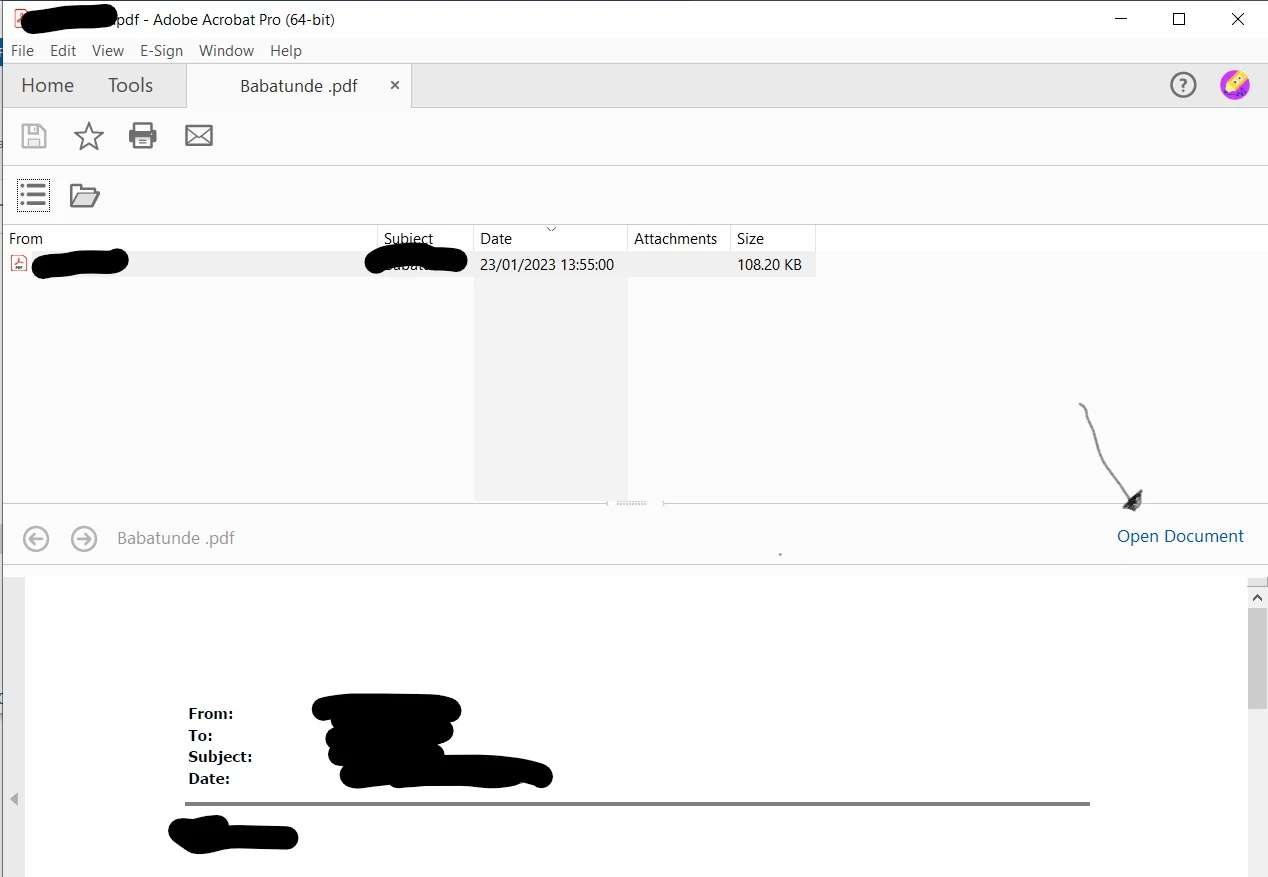
Have a user who when opening PDFs instead of opening the file directly into adobe

it takes to File explorer like screen within adobe a preview screen where they then have to clock open document to access the and use tools

What ive done

repaired adobe

ran updates on adobe

reinstalled adobe via creative cloud (uninstall -> restart -> re download)

image attached


looks like a feature is there a way to turn this off? just need to get it back so that when doubleclicking the pdf completely opens the document
This topic has been closed for replies.

1 reply

Abambo
Community Expert
Community Expert
May 10, 2023

What is your PDF version? What is your OS and version?

ABAMBO | Hard- and Software Engineer | Photographer
Zain01Author
Participant
May 10, 2023

Hi im not at the machine now but since i redownloaded from creative cloud it should be the latest version

Windows 10 vers21h2

Adobe Employee
May 12, 2023

Thanks @Zain01  for reaching out to us.


This type of view is displayed when we try to open portfolio pdf's. View will be different in case of non portfolio files.


We are able to reproduce this issue at our end with portfolio files only. 

So, please try once with non portfolio pdf and with portfolio pdf and observe if the view is different for you or not.


Please check once at your end and revert.