
Participant
April 9, 2015
Answered

File preview thumbnails aren't working for Acrobat DC files in Windows Explorer

  • April 9, 2015
  • 60 replies
  • 247026 views

I just upgraded from Acrobat XI to Acrobat DC on Windows 7, and now any new PDFs I create display with a generic PDF icon rather than a thumbnail preview of the file.  Files created in Acrobat XI are displaying correctly (see screenshot).  Is anyone else experiencing this and is there a resolution?
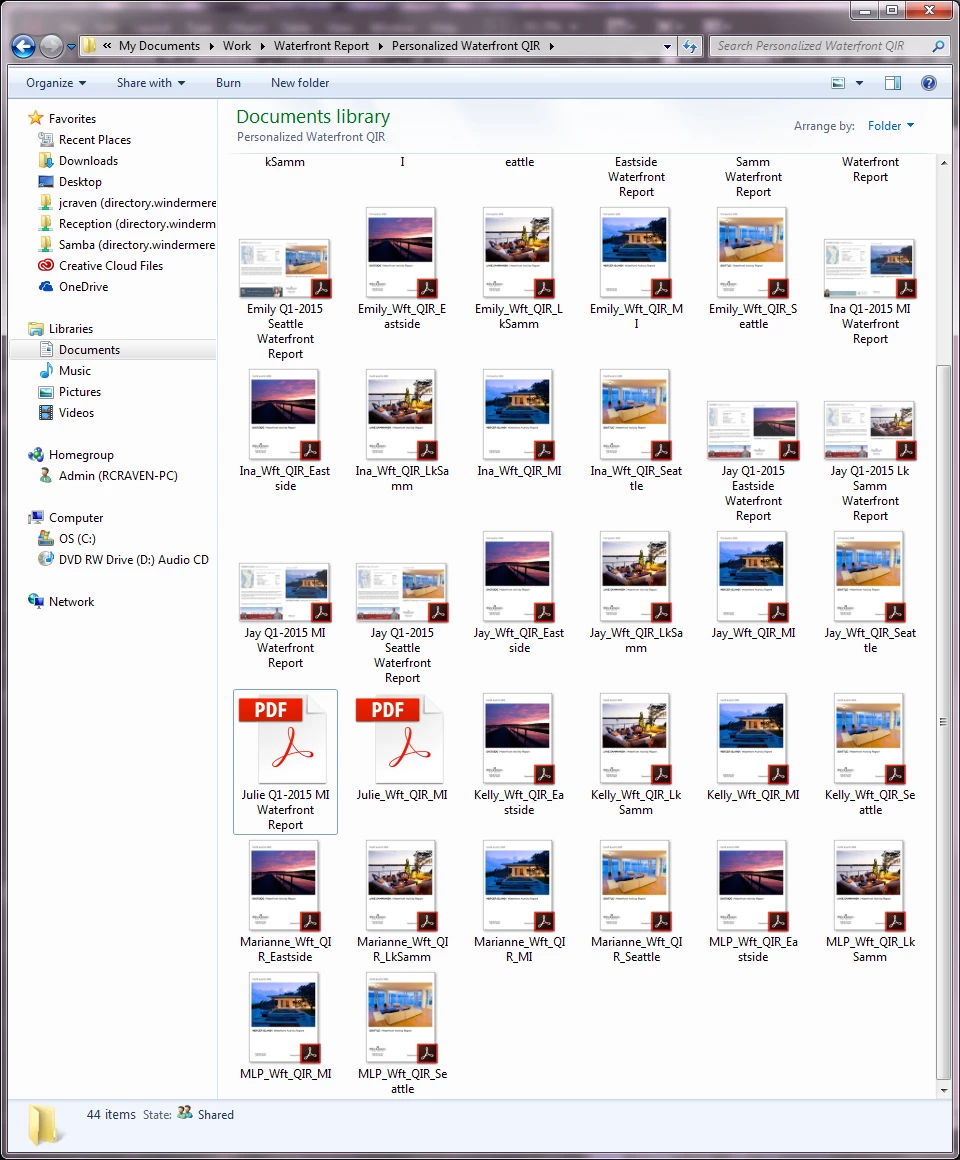

This topic has been closed for replies.
Correct answer AshuMittal9644438

Yeah, this is still what I get!


Hi djbilly

This was fixed in our update released yesterday. Make sure you are on the latest update by visiting Help > Check for updates.

Next, to enable thumbnail previews go to Preferences > General and then select Enable PDF thumbnail previews in Windows Explorer.

Thanks,

-ashu

60 replies

Participant
November 2, 2015

I just decided to uninstall Adobe DC and set Nitro PDF to open pdfs.  works great!  My issue wasn't so much the thumbnail as it was the file preview in File Explorer.  I use this daily as a way of not opening the file, but still being able to read the front page contents which is adequate for my work.  The update to DC removed this ability.  I had Nitro anyway for use as a print-to-pdf tool so one less tool on my computer.  Sayonara Adobe- has been a good 20 years!

michaelk20319476
Participant
November 1, 2015

Sad day for ADOBE.

This is what happens when managers are far away from users.

I am looking for an alternative.

Maybe see you when thumbnails are back.

cheers

Participant
October 29, 2015

If you’ve already installed DC, then the Adobe forum thread you reference has a work around for the thumbnail issue. It requires installing other (free) PDF software though.

They recommended installing “Foxit Reader,” and setting that as the default program, which then results in thumbnails showing on all PDF files. You can then set Adobe Reader DC as the default again, but the thumbnails remain.

https://forums.adobe.com/thread/1812515
http://www.foxitsoftware.com/downloads/

Participant
October 24, 2015

I totally agree with latest remarks : why fix the thumbnail problem only for 32 bit systems,

I guess, by now, most users are working on 64bit Windows.

Adobe is always sooooo slow to react, that's a pity.

You will loose customers to Foxit, I use both Acrobat DC and Foxit Phantom.

The latter is better right now (more responsive, more user-friendly and no thumbnails bug)

If nothing changes, I won't renew my Acrobat DC subscription.

dmitryv21589366
Participant
October 23, 2015

Would be great to have this feature back.

Sachin Soni
Adobe Employee
Adobe Employee
October 19, 2015

Hi,

With the October update of Acrobat DC released last week, we have added back the support of PDF Thumbnail previews in Windows Explorer for 32 bit systems.

Please note that by default, it is disabled. To enable the same, please go to Edit -> Preferences -> General and turn ON the check box "Enable PDF Thumbnail previews in Windows Explorer"

Thanks & Regards

Sachin Soni

Participating Frequently
October 19, 2015

that sounds good - but why only for 32bit machines???

i think the most people are using 64bit systems nowadays...

Participant
October 19, 2015

If they cared about customer service they would fix it for all versions especially Windows 10 64 bit and it would be enabled by default.  Just use Foxit Reader, so much easier.

Participant
October 14, 2015

Hello,

We have same annoying .pdf thumbnails problems here with all our workers (with win7 64 bit OS and Acrobat DC). When you will repair this issue? Any plans or scheduling?

With best regards..

Timo Pesonen, Quality Manager

Konepaja Häkkinen Oy

Participant
October 17, 2015

Could someone from Adobe please answer this question? After all, we are paying monthly for Adobe to "depreciate" for vague, "technical reasons" a basic, necessary feature that other, FREE programs, have solved. Even though you know, Adobe invented the very file format in question. It is too absurd to stand as it is and if we are, in essence paying every month for you to have your software function less productively than I  think we at least deserve an answer to Timo's question.

Participant
September 29, 2015

Fox It Reader worked for me on Windows 10.  Hopefully Adobe will fix this when their sales decrease because of this issue.  They are not getting a penny from me.  I am no longer using their products because of this. 

Participant
September 17, 2015

I followed the Foxit Reader suggestion, and it rocks!

Not only my thumbnails are back, but it opens 10 times faster and I don't have to be closing useless side panels.

I really don't edit PDFs files, but I have to store thousands of them, so Thumbnails, as stated on this thread, it's u MUST HAVE!.

To avoid wasting space and resources, I uninstalled Acrobat Reader 10, and I doubt I'll miss it at all.

Can't believe that in 4 years, Adobe still has this design error, and they don't care. Good for Foxit!!

Participant
September 6, 2015

This has bothered me as well since the day it went live. I prefer not to use older versions of apps like this so I've been without them since then. I also do not want to go through the tricks to get them back. I had searched back then but found no program, but I just searched again and found a completely free prog caleld PDF Preview to let you see PDF thumbnails in Windows Explorer. Works for 7 & older, 8 & 10 not mentioned, I don't have either so I can't test. PDF Preview for Windows 7 / Vista / XP / 2008 (PDF Preview Handler)

I just installed and it seems great, but I will say I'm not responsible if it messes up your computer. It ads a white stripe to the side of the thumbnail but it's certainly better than before. Like many of you I have 100s of PDFs sometimes in a folder and used to rely on the image previews. Also you have to pick this or Adobe reader to view the PDFs, so it is only partly helpful. You can swap the file association back & forth as needed since Adobe thinks a major thing people rely on isn't that important.