
dzgnr89
Inspiring
July 1, 2022
Question

File thumbnail preview not showing in windows explorer

  • July 1, 2022
  • 1 reply
  • 798 views

I am using 2022.001.20142

I am running Windows 10 - 64 bit . I have acrobat pro DC version 2022.001.20142.

I have enabled the thumbnail preview in the settings but still I am not able to see the thumbnails of my pdf in windows explorer.
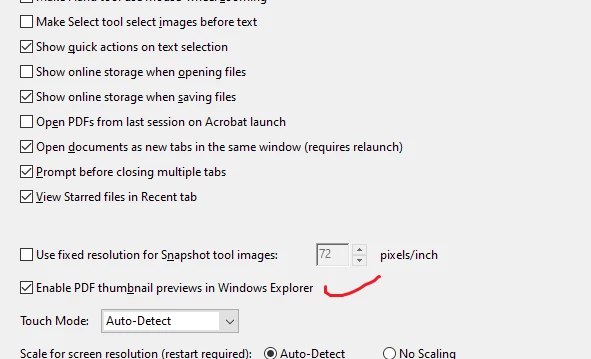


Please suggest a solution.

This topic has been closed for replies.

1 reply

AkanchhaS8194121
Legend
July 1, 2022

Hi,


Thanks for sharing the screenshot and application version.

We see that you have enabled the PDF Thumbnail preview within Acrobat's preferences setting. Just want to confirm that after selecting the checkbox "Enable PDF Thumbnail previews in Windows Explorer," did you press the OK button in the lower right corner of the preferences window?

  • Once you do that, a configuration window appears, as shown in the screenshot below:

  • If you haven't seen this window, the process was incomplete. Try the steps once again.


Once done, Go to Windows Explorer> click on View on the menubar at top> change it to Large icon or Medium. It might take a few seconds to apply the changes. 


Still didn't work? Open Acrobat>help> run "Repair Installation"> Close and reopen application.You may also check for pending Windows updates [if any]


Hope this helps!


Thanks,

Akanchha 

dzgnr89
dzgnr89Author
Inspiring
July 1, 2022

I enabled the tickmark in the checkbox before making the post. I kept facing the same issue. My windows OS is up to date. I went to Windows Explorer> View on the menubar at top> changed it to Large icon or Medium already before making the original post. 


After your suggestion, I repaired the installation as per your steps. Still facing the same issue. I also rebooted my laptop. 

AkanchhaS8194121
Legend
August 5, 2022

Hi,

Sorry for the delay in response to your last post.

Acrobat and Reader official update 22.001.20169 is now available. Go 

to Help > Check for Updates>reboot Acrobat and install the latest patch. 

Let us know if it this helps.

More information about this release is here: Release Notes | Adobe Acrobat, Reader


Thanks,

Akanchha