



fill and sign
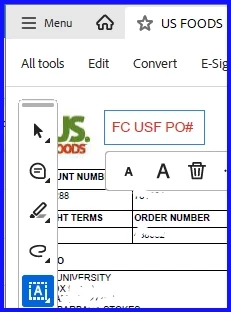
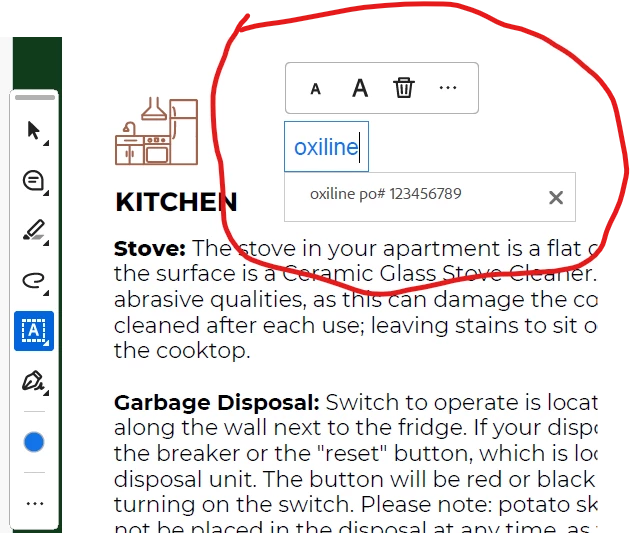
When I use the "Fill & Sign" feature to annotate a plain PDF that DOES NOT have preset fillable text fields/boxes (I’m not trying to fill in a field/text box), it no longer shows a dropdown of my previously typed text when I start typing (see first image below). It used to show previously typed text and I could just click on what I needed and it saved me so much time at work. I am running "Abode Acrobat (64-bit) (25.001.21288) which is the newest version as of March 24, 2026. I'm using Adobe on Windows 11 Enterprise on my work computer. This still works on my personal computer though (see second image below). I am running the same version of Adobe on both computers. My personal computer is using Windows 11 Home ver 25H2. I have tried several "fixes" for my work computer Adobe that I found in other Adobe Community Posts that did not work. I have repaired installation, checked updates, went to “Preferences”--> "Forms"-->”Auto-Complete” and the auto-complete box was already set to basic (even switched it to advanced and that didn’t help either). This feature was VERY useful to me and saved me so much time at work but now I have to go lookup every purchase order number that I need to type on an invoice (which is about 50-60 per day). What else can I do to get this to show my previously typed text on plain PDFs that DOES NOT have preset fillable text fields?
 AdChoices