Participating Frequently
November 14, 2023
Question

Fill and Sign not available after side-ribbon menue update. Serious business impact!

  • November 14, 2023
  • 2 replies
  • 814 views

Dear Acrobat community. Our business process is suddenly quite obstructed. 

Even after a couple of re-installs, hours of online search etc. we can not find the issue. 

The adobe signature field is suddenly missing. (since the side ribbon). 


We use this feature to digitally sign all print material and all outgoing communication. As an agency, this is quite a lot. 


Where is it? How do we get it back? Why was it suddenly made unavailable? 


Thank you very much.


This topic has been closed for replies.

2 replies

Adobe Employee
November 16, 2023

Hi Avion,


Sorry for the inconvenience!

Can you please elaborate more about the issue?

If you click on Fill and Sign, you will get signature field in left pane. Also, you can click on Sign in top bar.


Please let us know if it helps.

It would be great if you can mention the exact steps.


Thanks

Sanchi

Mr.AvionAuthor
Participating Frequently
November 16, 2023

Hey @sanchij95032186 


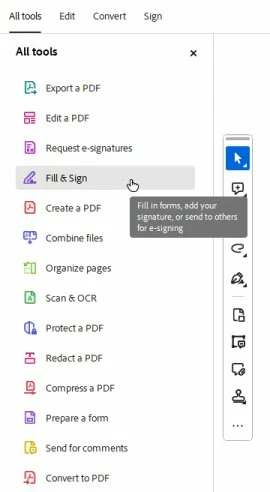
that is the problem. There is no sign Fill and Sign option anymore. No matter how often I re-install. No matter on what machine. It is, like in the screenshot attached. We can not add it, on my account nor on the others accounts. 


Can you please let us know what to do? Do we need to revert to an older edition to have this process remaining?


Adobe Employee
November 17, 2023

Thanks Avion!

Can you please tell:

1. Are you using Mac/Win machine? Which OS?

2. What is the Acrobat app version?
3. Can you please tell which workflow you performed before facing this issue? like login with new account or updated Acrobat or ran any registry?

4. Since how long have you been facing this issue?

5. Also, can you please export and share following reg:

Press Windows+ R-> write 'regedit' ->press enter->goto  Computer\HKEY_LOCAL_MACHINE\SOFTWARE\Policies\Adobe\Adobe Acrobat\Trunk\FeatureLockDown

To export it, right click on FeatureLockDown folder->click on Export->save it on your local machine and attach here.


Thanks 

Sanchi

Mr.AvionAuthor
Participating Frequently
November 15, 2023

Can please someone from Adobe mods react do this? We are getting no feedback what so ever over the support. 

"We will look into this" is the going answer.