Participant
May 30, 2021
Question

Fill and Sign not working

  • May 30, 2021
  • 3 replies
  • 1164 views

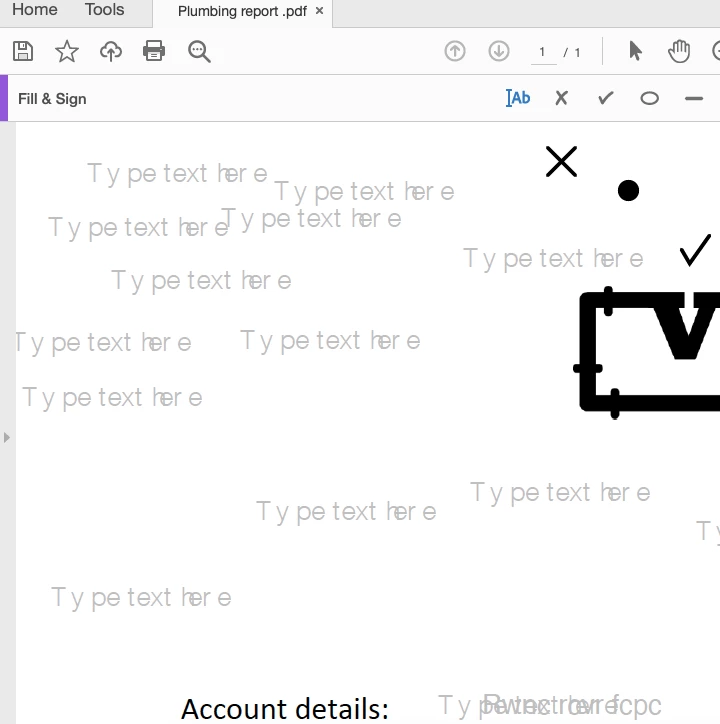
When I try to fill a PDF, when I click, it just writes 'Type text here' and won't let me type (as shown below). The X and tick work.

 

This topic has been closed for replies.

3 replies

Known Participant
January 20, 2022

Uninstall and reinstall Adobe, then try. Better yet, uninstall Adobe and install Foxit, it is far superior to Adobe.

Meenakshi Negi
Community Manager
Community Manager
May 31, 2021

Hello,


Thank you for reaching out and sorry for the trouble.


As the Fill & Sign not working, please confirm if the issue occurs with a particular PDF?

Try repairing the application installation. In the application, go to Help > repair Installation.


Please share the current version of the application and OS version on the machine.

It would be helpful if you can share the PDF on which the issue occurs. We would like to replicate the behavior at our end.


Let us know if you need any help.


Thanks,

Meenakshi


Participant
August 8, 2021

It is with any and all PDFs.

OS Version is 11.4 Big Sur

Acrobat version is 2021.005.20048


If you can help that would be great. 

Known Participant
May 31, 2021

Can you share the file?