
Participant
October 7, 2020
Question

Fill and Sign: Signature not loading

  • October 7, 2020
  • 1 reply
  • 281 views

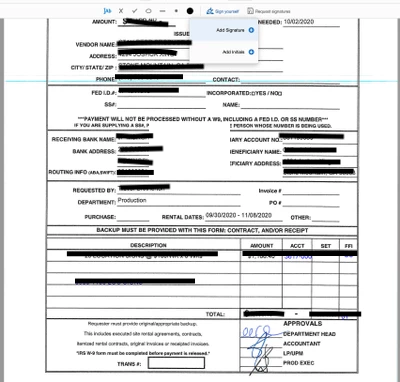
We're having some trouble with the Fill and Sign feature not working after using it 5 or more times in a row. We have approvers sign documents digitally, and they often have to go through several documents at a time. After loading multiple tabs and using the Sign on multiple pages, it will quit loading the saved signature and sometimes we will experience terrible lag. It's causing a pretty serious halt in our workflow. I'd love to get some more information on this. Additionally, we are often pulling these saved documents from Dropbox, which could also be the cause of the issue. Image includes personal info, so that is blocked out. However, you can see the saved signature not loading.
This topic has been closed for replies.

1 reply

ls_rbls
Community Expert
Community Expert
October 7, 2020

Is this happening even if if you click on Help--->"Repair Installtion"?


Also, it is better to employ the Adobe Sign tool for this type of workflow instead of "Fill & Sign".


I am only stressing about this observation because you mentioned about users pulling the files from Dropbox.


You may have users trying to fill and sign the PDFs via web browser which forces the user to use Dropbox's PDF viewer instead of manually downloading and opening the PDFs in Adobe Reader DC (if that is what they have installed in their computers).


With Adobe Sign you'll guarantee that a user will always fill and sign their assigned data and signature blocks, which can be doen from a mobile device as well as web browser without the need to have Acrobat Pro  or Reader DC installed in their machines.