Participant
April 26, 2018
Answered

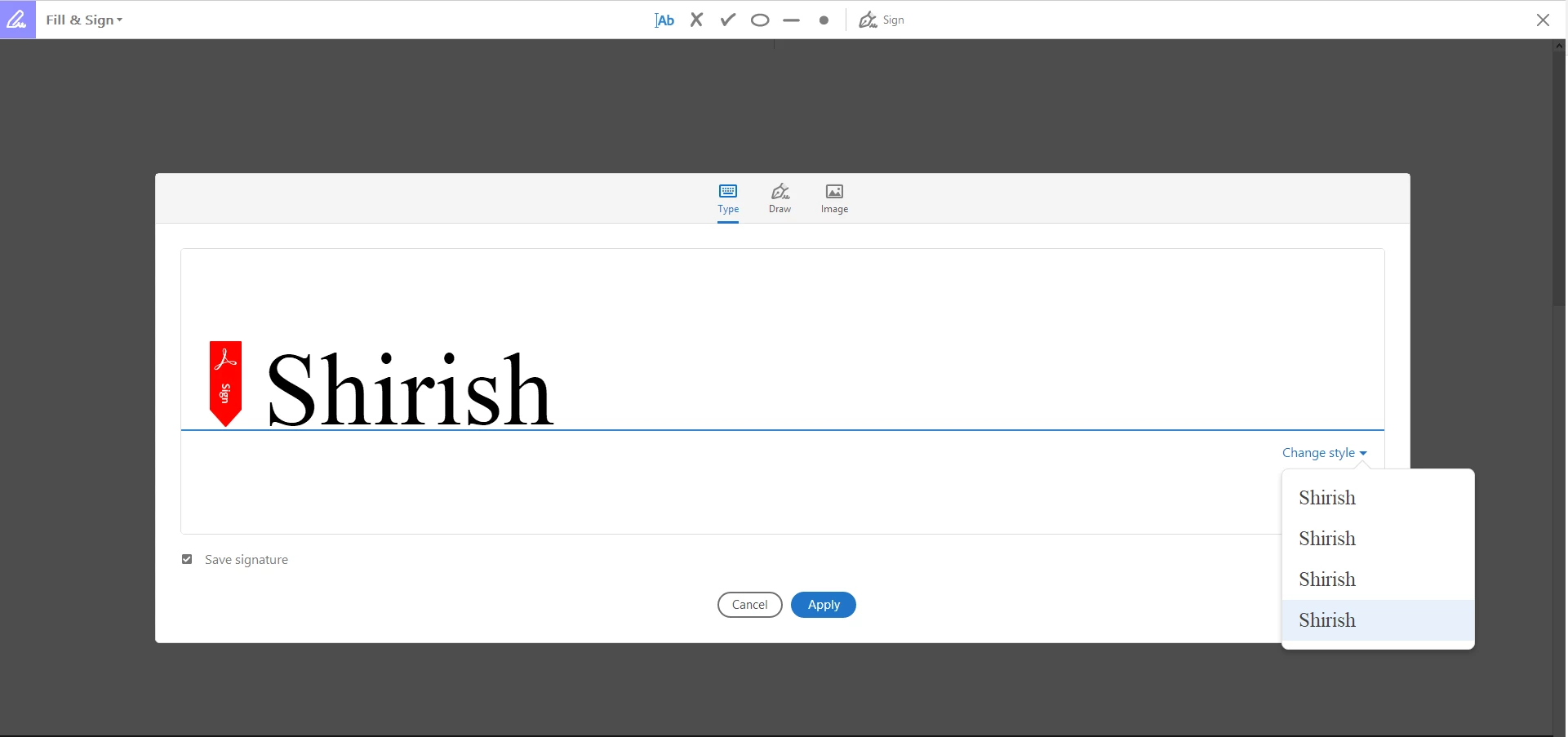
Fill & Sign Change Style under Type shows all Style appear to be same

  • April 26, 2018
  • 1 reply
  • 614 views

I am running into an issue while using Fill & Sign tool. Whenever I choose this tool to enter a Signature using (Type) as an option, I observer the Change Style shows all the style as same with no difference. I am not able find what could be the cause of this, can someone please help me.

This topic has been closed for replies.
Correct answer AnandSri

Hello Shirishm,

We apologize for the inconvenience caused, as per the description above, you are not able to change the font size when typing using Adobe Fill&Sign, Is that correct?

Please check for any pending updates of Acrobat installed from help>check for updates, reboot the machine after installing any updates and see if this brings any difference.

Try signing any PDF using the URL https://cloud.acrobat.com/fillsign  on a browser like Chrome, or Firefox, or Safari and check is it giving you the option to change the Style.

Are you signing the PDF using Acrobat or the freeware Adobe Reader? What is the dot version of Acrobat or Reader installed? To identify refer to Identify the product and its version for Acrobat and Reader DC

Is it a Mac or Windows? Have you tried any other PDF file or is it specific to one PDF file?

You can also try resetting the preferences of Acrobat or Reader installed once and reboot the machine, to reset the preferences refer to How to reset Acrobat Preference settings to default.

Let us know how it goes and share your findings.

Regards,

Anand Sri.
1 reply

AnandSri
AnandSriCorrect answer
Legend
May 3, 2018

Hello Shirishm,

We apologize for the inconvenience caused, as per the description above, you are not able to change the font size when typing using Adobe Fill&Sign, Is that correct?

Please check for any pending updates of Acrobat installed from help>check for updates, reboot the machine after installing any updates and see if this brings any difference.

Try signing any PDF using the URL https://cloud.acrobat.com/fillsign  on a browser like Chrome, or Firefox, or Safari and check is it giving you the option to change the Style.

Are you signing the PDF using Acrobat or the freeware Adobe Reader? What is the dot version of Acrobat or Reader installed? To identify refer to Identify the product and its version for Acrobat and Reader DC

Is it a Mac or Windows? Have you tried any other PDF file or is it specific to one PDF file?

You can also try resetting the preferences of Acrobat or Reader installed once and reboot the machine, to reset the preferences refer to How to reset Acrobat Preference settings to default.

Let us know how it goes and share your findings.

Regards,

Anand Sri.