
NocteDraconis
Participant
May 22, 2024
Question

Fillable form junk characters

  • May 22, 2024
  • 1 reply
  • 312 views

Hello, I hope someone can assist with this as we were not able to solve the issue with possible solutions found on the forum or other support sites.


We have a fillable form that displays normally when the original empty form is first opened, like in the example below:
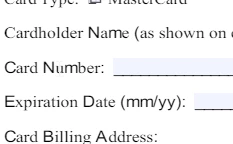
 

However, the moment you click on the Card Number field to start typing, the form characters break and it looks like this:
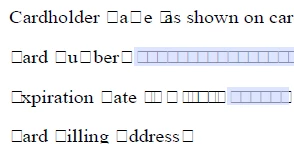
 

We have tried disabling the option ''Use local fonts'', we tried re-creating the form with different fonts or field types and it breaks every time. We tested in Adobe Standard 2017 and 2020 and the issue is the same.


Any ideas what might be breaking the form?


Thank you!

This topic has been closed for replies.

1 reply

NocteDraconis
Participant
May 22, 2024

UPDATE: we did additional testing and figured the form is breaking when the filled out document is saved with the option ''Save'' or ''Save as'', however if it's saved with the option ''Print-to-PDF'' it doesn't break.

Thom Parker
Community Expert
Community Expert
May 22, 2024

It looks like you have some kind of bizare embedded font subset issue.  How was this form converted into PDF?

Printing to PDF doen't save the form so much, as it creates a flattened version with no form fields. 


Thom Parker - Software Developer at PDFScriptingUse the Acrobat JavaScript Reference early and often