


Participant
March 21, 2025
Answered

Fillable Form using a table to calculate a result (JavaScript)

  • March 21, 2025
  • 3 replies
  • 548 views

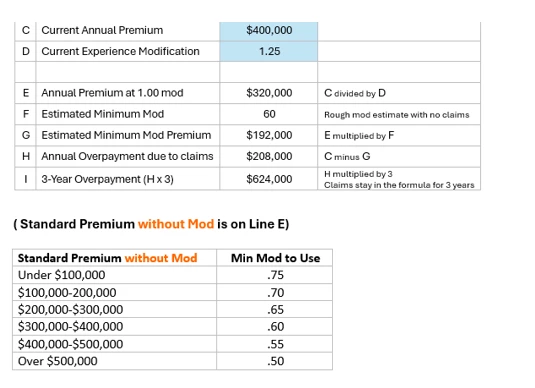
I have a table to calculate a result but cannot seem to get the java script right.  In Line F of the form, the Estimated Minimum Mod is calculated referencing the calculation in Line E. For example:  the table incorporates a range of numbers - if line E is $320,000, which is between $300,00-$400,00, then line F is .60 or if Line E is $90,000, which is less than $100,000 Then Line F is .75.  Line E is the result of Line C, the Current Annual Premium (which is entered by the user), divided by Line D Current Experience Modification (which is also entered by the user). The resulting number in Line F is used to calculate the number in Line G, which is E times F.   The calculations should flow, but I cannot get the script right for Line F to produce any number. I would greatly appreciate some help with the script for line F.  Thank you.
 

Correct answer Nesa Nurani

You can use this as custom calculation script of 'F' field:

var str = this.getField("E").valueAsString;

if(str == "")
 event.value = "";
else{
 var e = Number(str);
if (e < 100000) 
 event.value = 0.75;
else if (e < 200000) 
 event.value = 0.70;
else if (e < 300000) 
 event.value = 0.65;
else if (e < 400000) 
 event.value = 0.60;
else if (e < 500000) 
 event.value = 0.55;
else 
event.value = 0.50;}

Replace "E" with your actual field name in line E, and also pay attention to field calculation order.

3 replies

Nesa Nurani
Community Expert
Nesa NuraniCommunity ExpertCorrect answer
Community Expert
March 22, 2025

You can use this as custom calculation script of 'F' field:

var str = this.getField("E").valueAsString;

if(str == "")
 event.value = "";
else{
 var e = Number(str);
if (e < 100000) 
 event.value = 0.75;
else if (e < 200000) 
 event.value = 0.70;
else if (e < 300000) 
 event.value = 0.65;
else if (e < 400000) 
 event.value = 0.60;
else if (e < 500000) 
 event.value = 0.55;
else 
event.value = 0.50;}

Replace "E" with your actual field name in line E, and also pay attention to field calculation order.

Participant
March 24, 2025

Thank You - it worked perfectly.  On my end I had to fix labels, and upper/lower case on the lables.  Much gratitude to you!

Bernd Alheit
Community Expert
Community Expert
March 22, 2025

What script do you use at Line F?

kglad
Community Expert
Community Expert
March 21, 2025

in the future, to find the best place to post your message, use the list here, https://community.adobe.com/

p.s. i don't think the adobe website, and forums in particular, are easy to navigate, so don't spend a lot of time searching that forum list. do your best and we'll move the post (like this one has already been moved) if it helps you get responses.


<"moved from using the community">
