
Answered
Fillable Forms
When using a fillable form, is there a way to turn off the little popup that comes up when you hover over an entry field for a couple seconds?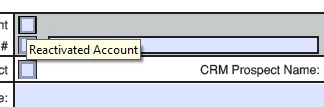
When using a fillable form, is there a way to turn off the little popup that comes up when you hover over an entry field for a couple seconds?
Hi Alexandraz,
As you need to remove the pop-up that appears when you hover over a form field, it can be done while creating the PDF form.
When you create the PDF form in Acrobat DC, double-click on form field to open the Text Field Properties window.
Under the General Tab, keep the Tooltip box blank.
Then if you hover over the field, the pop-up will not appear.
The pop-up actually is the tooltip that is added to the field so the user gets help in filling the form.
Hope that answers your query,
Let us know if you have any questions.
Regards,
Meenakshi
Already have an account? Login
Enter your E-mail address. We'll send you an e-mail with instructions to reset your password.
 AdChoices