
Participant
April 20, 2023
Question

Filling in forms does not work on mobile in Adobe Reader

  • April 20, 2023
  • 2 replies
  • 991 views

Hi,

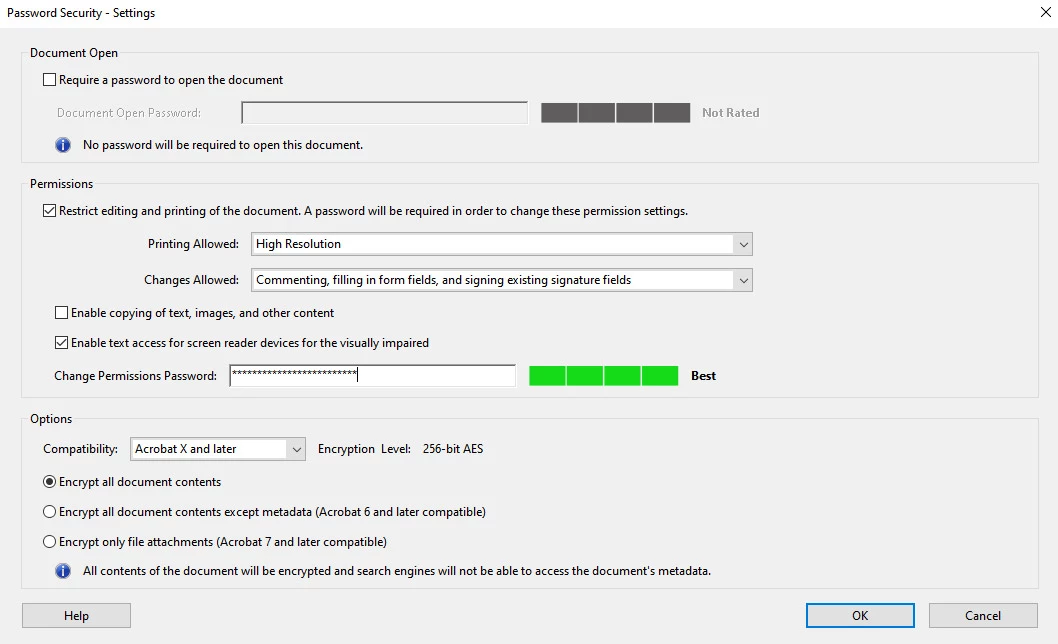
I made my pdf document in Acrobat Pro password protected. The option to fill in forms is enabled, but when opened on mobile in Adobe Reader, the form cannot be filled out. It says it's read-only, but that's not correct. Any help to make my form fillable on mobile? on PC if it works properly.

I want the form to be fillable on mobile, but not extract the pages.
This is the security settings for the file:
 

This topic has been closed for replies.

2 replies

Participant
May 14, 2023

I have similar issue with Acrobat mobile and password protected form. Mobile app works only if form is not password protected, which is not acceptable for me.

The only mobile app from several tested which work for me, is Foxit PDF Editor.


Karl Heinz  Kremer
Community Expert
Community Expert
April 21, 2023

There is a big difference between PDF viewers on mobile devices and the desktop version of Adobe Acrobat or Reader. Unfortunately, this also is true for Adobe's own mobile Reader. You could try other 3rd party PDF viewers (I am pretty happy with Readdle's PDF Expert, which unfortunately is not free - but even that is nowhere near Adobe's desktop applications).