Participating Frequently
June 19, 2023
Question

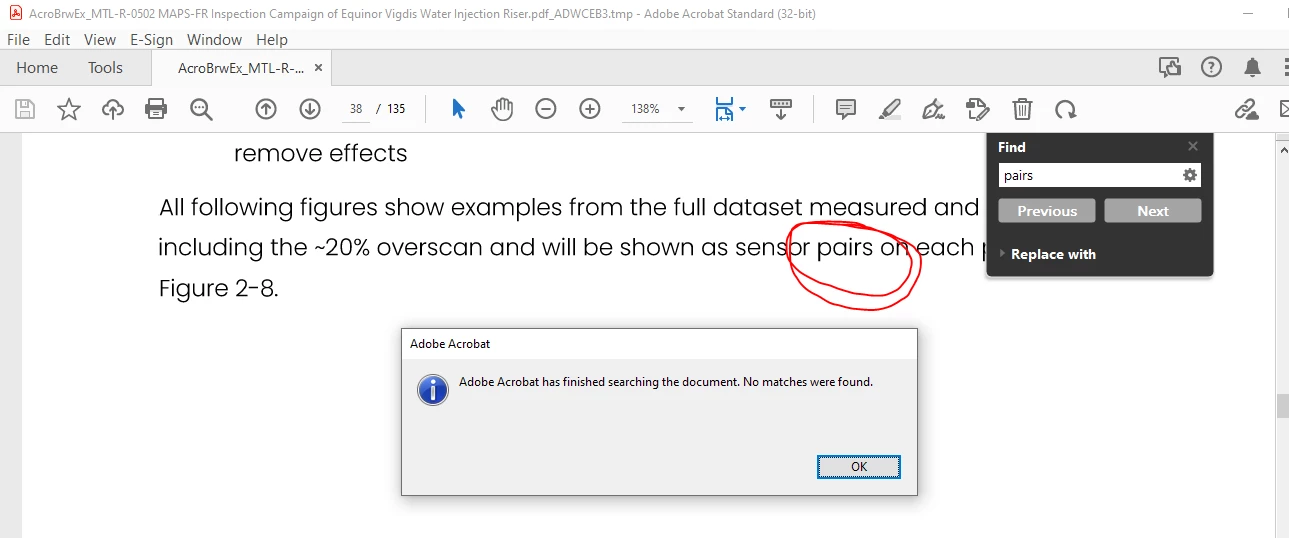
"Find" doesn't work
  • June 19, 2023
  • 3 replies
  • 1185 views

Even when I type words that I see in the document, I get: "No matches were found".

This topic has been closed for replies.

3 replies

Participating Frequently
June 19, 2023

How do I do step 1? By trying to copy text from the document using the cursor?

Abambo
Community Expert
Community Expert
June 19, 2023
quote

How do I do step 1? By trying to copy text from the document using the cursor?


By @Vibeke30584619n71k

Sorry, but you were answering to a spammer's message. That one has been quarantained. 


You really see nicely if a PDF is a scan, when you zoom in the document very strongly. Kind of one character on the screen. If the character outlines are still sharp, it's not a scan. As scans are images they scale differently, and do not apear smoth and sharp when zoomed strongly.

ABAMBO | Hard- and Software Engineer | Photographer
Bernd Alheit
Community Expert
Community Expert
June 19, 2023

Can you select and copy text? What does you get when you paste it in a text editor?

Participating Frequently
June 19, 2023

No... select text doesn't work either. I'm using the desktop version of Adobe Acrobat Standard. Shouldn't that be OK?

Bernd Alheit
Community Expert
Community Expert
June 19, 2023

When you can't select text it is a scan of a document.

Abambo
Community Expert
Community Expert
June 19, 2023

Are you certain that the PDF is a Text PDF and not a scanned PDF? When, with scanned PDFs, you do not do OCR, the pages are only images, and there is no text data attached.


Check with a different file, like a PDF file you created using a word processor.

ABAMBO | Hard- and Software Engineer | Photographer
Participating Frequently
June 19, 2023

I do not believe it is a scanned file. When I for instance search for "B" I get a lot of matches, but not all of them... It seems like I get all the relevant matches in Figures and Tables, but fewer in the text sections.