


Inspiring
August 26, 2020
Answered

Flattenning a PDF

  • August 26, 2020
  • 5 replies
  • 6525 views

Hello. I've been researching this topic for a while online, but have not been able to find a solution. I would like to flatten a pdf file so that it can not be edited at all. Basically, make each page like a picture file so that if you go the the Edit feature of Acrobat, you will not be able to click on any of the elements. I've done this in the past by exporting each page as a jpeg and then inserting each jpeg back into Acrobat as a page, but I have a large document that needs this function and it is a real pain to do it that way. Is there a function within Acrobat that will accomplish this without having to export pages as jpegs? There are multiple tutorials about "flattening" with the Preflight panel, but this doesn't seem to do anything. Maybe that just works for the forms. I need all elements to be flat. Thanks for any help with this!
This topic has been closed for replies.
Correct answer Luke Jennings3

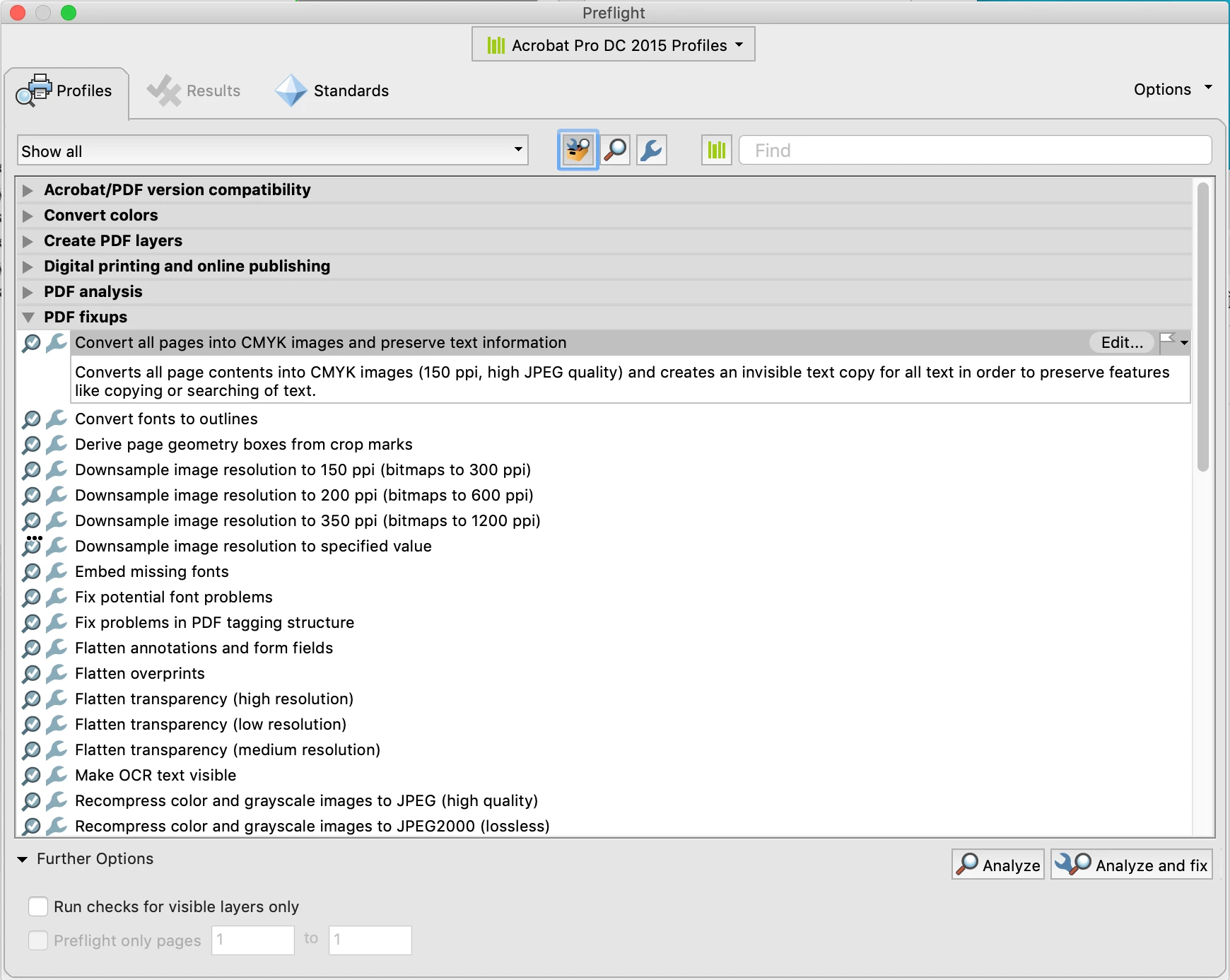
You could use an Acrobat preflight to convert all of the pages to cmyk images, making the watermarks almost impossible to remove, although this would likely increase the size of the PDF. Tools> Print Production> Preflight. You can edit a copy of the preflight and change the resolution of the image conversion (the default is 150 ppi).

Alternately, you could add the watermarks to a copy of the images in Photoshop and save as a new name, then export to a new (proof) PDF, which would protect your images, preserve the existing vector elements and produce a smaller PDF.

5 replies

Participant
January 29, 2022

Print the file as pdf: 

Select the printer as Microsoft print to PDF;

Through  Properties: select landscape,

Through Advanced option: Paper size to Tabloid


Legend
January 29, 2022

Printing a file to PDF is never recommended and DOES NOT flatten in the way that the original post needs. 

Luke Jennings3
Community Expert
Luke Jennings3Community ExpertCorrect answer
Community Expert
August 26, 2020

You could use an Acrobat preflight to convert all of the pages to cmyk images, making the watermarks almost impossible to remove, although this would likely increase the size of the PDF. Tools> Print Production> Preflight. You can edit a copy of the preflight and change the resolution of the image conversion (the default is 150 ppi).

Alternately, you could add the watermarks to a copy of the images in Photoshop and save as a new name, then export to a new (proof) PDF, which would protect your images, preserve the existing vector elements and produce a smaller PDF.

Inspiring
August 26, 2020

Thanks Luke. This solution may be able to work for me. The watermark doesn't merge with all the design elements, but enough of them to make the file unprintable without them. Is there any way to change the output resolution to 300 instead of 150 ppi? It looks a little fuzzy once this is done.

Luke Jennings3
Community Expert
Community Expert
August 26, 2020

Yes, you can adjust the resolution, you first need to duplicate and re-name the existing profile (from the little fly-out menu), you can open and edit the new profile to change the settings.

Legend
August 26, 2020

There are four common meanings of "flatten" with regard to PDF files. Yours is none of these... if you believe it's uneditable, perhaps you have an old (pre-DC) version of Acrobat? Newer versions make sure that "flattened" files are editable again, at least for the text.

Inspiring
August 26, 2020

I'm not worried about ocr. This is a print piece that I'm adding a watermark to. I want the watermark to be flat with the graphics so the client can't remove it since it's a high resolution proof and they haven't paid yet. The text with ocr will do them no good without the graphics. 

Dave__M
Community Expert
Community Expert
August 26, 2020

Perhaps you could import the watermark into a PDF as a new layer, set it to be behind the existing text, and then flatten from the layers panel.  You'd have to give it a try to see if this notion meets your desired outcome.

I hope this helps!

My best,

Dave

Karl Heinz  Kremer
Community Expert
Community Expert
August 26, 2020

Converting a PDF to image only will only deter those from copying your information who are not aware of Acrobat's OCR functionality. It's one mouse click, and I can edit your file in e.g. MS Word and have access to all the information in your file. Besides not being good copy protection, it makes the PDF file less usable: It's much larger than a "good" PDF file, and it cannot be searched. I would advise against doing that. Use a strong password and the hightest possible encryption level, and you will do a much better job in proecting your file. Unless you start to work with certificates, there is no method that will absolutely protect your file. If there is enough criminal energy, somebody will find a way to get into your file. 

Bernd Alheit
Community Expert
Community Expert
August 26, 2020

You can password protect the file.

Inspiring
August 26, 2020

I'd rather not do it that way because there are so many ways online to get around the passwords. It's very easy to upload a pdf to tons of websites that will remove them. Flattening it is really the only way to be sure it won't be edited.

Bernd Alheit
Community Expert
Community Expert
August 26, 2020

"Flattening it is really the only way to be sure it won't be edited."

Why does you assume this?