
Participant
March 12, 2021
Question

Font error - wrong coding?

  • March 12, 2021
  • 3 replies
  • 2022 views

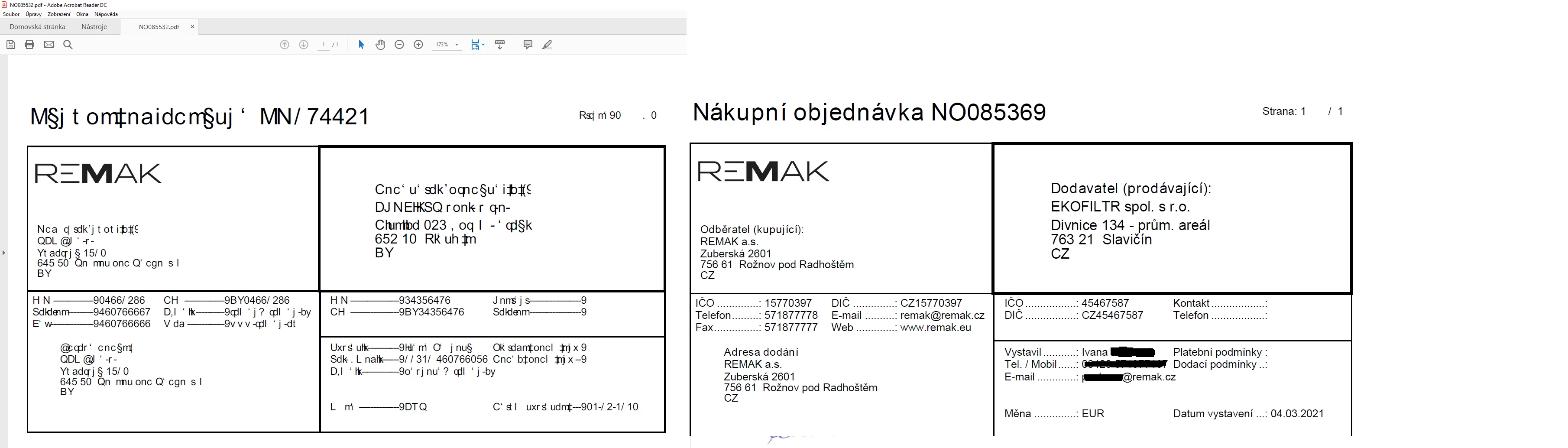
Hi all! I have problem, and I was unable to find the answer. This is happening only on single PC, with Adobe Reader. Other computers or other pdf browsers on that PC are OK with the File.


Looks like characters are wrong interpreted - looks like Adobe is picking wrong char from char table. There is a rule - Characters are x-1. Correct is O, displayed is N. Same in numbers area - 763 21 is displayed as 652 10, CZ as BY. There are also Czech specific chars, some other (i believe x-1) char is displayed. 


As this issue is happening only in one PC with Windows 10 running, I was trying some un/reinstall steps as is: fully clean program folder, clean APPDATA, clean registry keys. Nothing helped. 

I'm putting preview as an attachment. Thanks for your time and advices.
 

This topic has been closed for replies.

3 replies

Participant
May 18, 2021

Hi, we have the same problem as you describe at 5 PC, but the other is working fine. Did you find a solution?

Participant
May 20, 2021

Hi, nope. No feedback from adobe. We are using other software for PDF now.. 😞

Looks like if you don't have Acrobat PRO there "is no" solution.

Luke Jennings3
Community Expert
Community Expert
March 15, 2021

Try running an Acrobat preflight fixup. Tools> Print Production> Preflight> Fixups.

Participant
March 15, 2021

Thanks Luke, but I don't have / need to have Acrobat PRO. So this functionality is not available for me.

ls_rbls
Community Expert
Community Expert
March 13, 2021

Is this a PDF that was created from a scanned document?


You may want to use the Accessibility Tool checker and run a full report to spot the issues.


Can you share an example if this PDF?

Participant
March 15, 2021

Hi, thanks for the reply. PDF seems to be created by Microsoft Dynamics. I know there were some issues with earlier versions of Reader before. There are some errors in PDF, but mu question is WHY 30 other PCs are fine with it and this one have problems only with Adobe Acrobat Reader.


Validating file "NO085369.pdf" for conformance level pdf1.3

The "endobj" keyword is missing.

The key FontName is required but missing.

The key Encoding has a value Identity-H which is prohibited.

The document does not conform to the requested standard.

The file format (header, trailer, objects, xref, streams) is corrupted.

The document doesn't conform to the PDF reference (missing required entries, wrong value types, etc.).

The document contains fonts without embedded font programs or encoding information (CMAPs).

The document does not conform to the PDF 1.3 standard.

Done.
ls_rbls
Community Expert
Community Expert
March 16, 2021

Would you mind sharing exactly which tool from the Microsoft Dynamics suite was used to create the PDF?


Was the PDF created from a mobile device?


I would say that if the file is posing no issues with other computers, does that means that all of those other 30 computers have the exact same operating system version, exact version update of the operating system, the same version Adobe Reader DC with the same update version, and the same exact configuration of Microsoft Dynamics on each computer and mobile device(if any)?


This looks to me that the computer that is having the issue is somehow not configured properly or is also participating in a cloud service  like SharePoint or something and needs attention.


But in any case, I think you need to check the Micrososft Dynamics Productivity Tools settings in thatparticular computer, specifically the "Convert to PDF" settings. The template for "Invoice" at a minimum should appear enabled.


If none of these are the issues, then you may have to verify if that computer Windows version has the appropriate language localization for both Acrobat and the operating system.


It is possible that there is an incorrect character mapping of the UTF-8 character sets. So maybe, just maybe, that windows computer UTF-8 needs to be set as default or disabled... I may be wrong though.