Participating Frequently
May 21, 2022
Question

Font issues converting Word doc to PDF

  • May 21, 2022
  • 3 replies
  • 1963 views

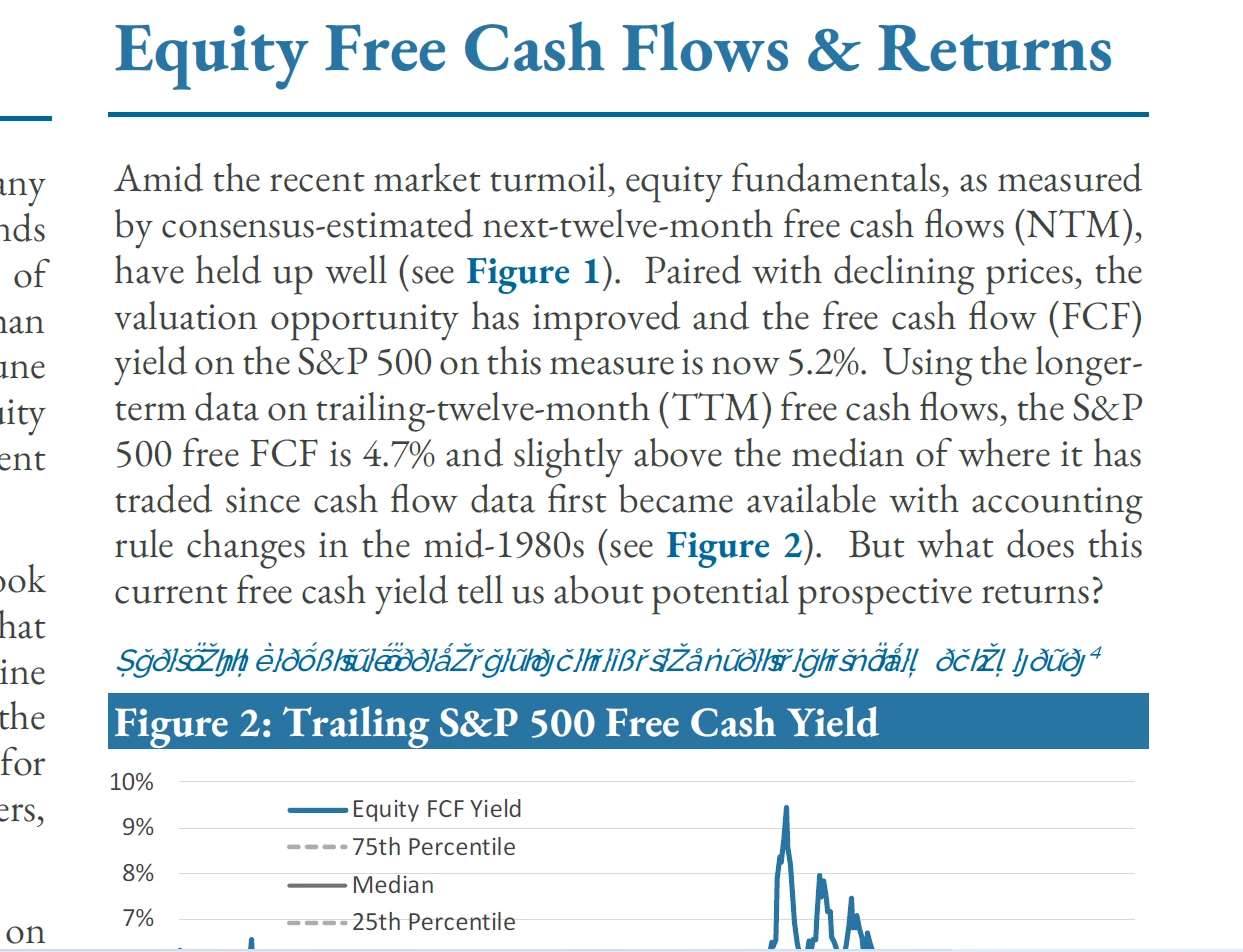
Hello - These conversions used to work perfectly, but all of a sudden a font "Raleway Medium" that I use in Word will not convert to PDF.  See caption above "Figure 2".  I can't figure this out.  Thanks!
 

This topic has been closed for replies.

3 replies

Bevi Chagnon - PubCom.com
Legend
May 23, 2022

It appears that the font is not being embedded into the PDF.

Here's another way to export a PDF from MS Word and designate that all fonts are embedded.


From the Acrobat Ribbon tab (1) in Word, select Preferences (2). The next steps control the settings for Adobe PDF Maker plug-in that will export the PDF.


Choose whether you'll make a PDF for printing/press, accessible, standard, and whatever settings needed for the purpose.

Select Advanced Settings button (4), and from the left side menu, navigate to the Fonts section (5).

Check the settings shown in (6) that will embed all the fonts.

And clear out fields (7) and (8).


Save and exit the series of dialogue boxes to return to your document.


From the Acrobat Ribbon tab again, select Create PDF icon in the upper right (10). PDF Maker will now export the PDF based on your settings.


This method should forced all fonts to be embedded into the PDF, as long as the font is licensed for embedding. Note that some fonts are restricted. Raleway should be embeddable, but it is available from many font sources, including cheap freebie websites, that might have a buggy copy.


One of the best, most reliable websites for open source fonts is https://fonts.google.com/specimen/Raleway#standard-styles


Hope this helps resolve your font problem.


|    Bevi Chagnon   |  Designer, Trainer, & Technologist for Accessible Documents ||    PubCom |    Classes & Books for Accessible InDesign, PDFs & MS Office |
Participating Frequently
May 23, 2022

Thanks.  I followed those steps but still having the same issues.  I re-installed the fonts prior, and now again... but I notice certain fonts that exist in c:/windows/fonts do NOT appear in the font list in the following menu.  Do you know why Adobe is not seeing these, including Raleway?  Thank you!


JR Boulay
Community Expert
Community Expert
May 21, 2022

Try this from Acrobat Pro : File menu : Open (File type : All) the DOCX file.

Acrobate du PDF, InDesigner et Photoshopographe
Participating Frequently
May 22, 2022

Same result, unfortunately.  Thanks..

Legend
May 22, 2022

Suggest: don't print to PDF. Don't save as PDF. Instead use Save as Adobe PDF in Word. Fixes many limitations with Word, worth a try. 

JR Boulay
Community Expert
Community Expert
May 21, 2022

What process do you use for the conversion?

(PDFMaker, Save as PDF, Open with Acrobat…)

Acrobate du PDF, InDesigner et Photoshopographe
Participating Frequently
May 21, 2022

Save as PDF.  If I use the Adobe PDF Printer, I have other odd issues. Thanks.
