Participant
April 29, 2025
Answered

Font issues when creating/editing/saving my own documents/templates

  • April 29, 2025
  • 1 reply
  • 1707 views

Hello everyone 🙂 


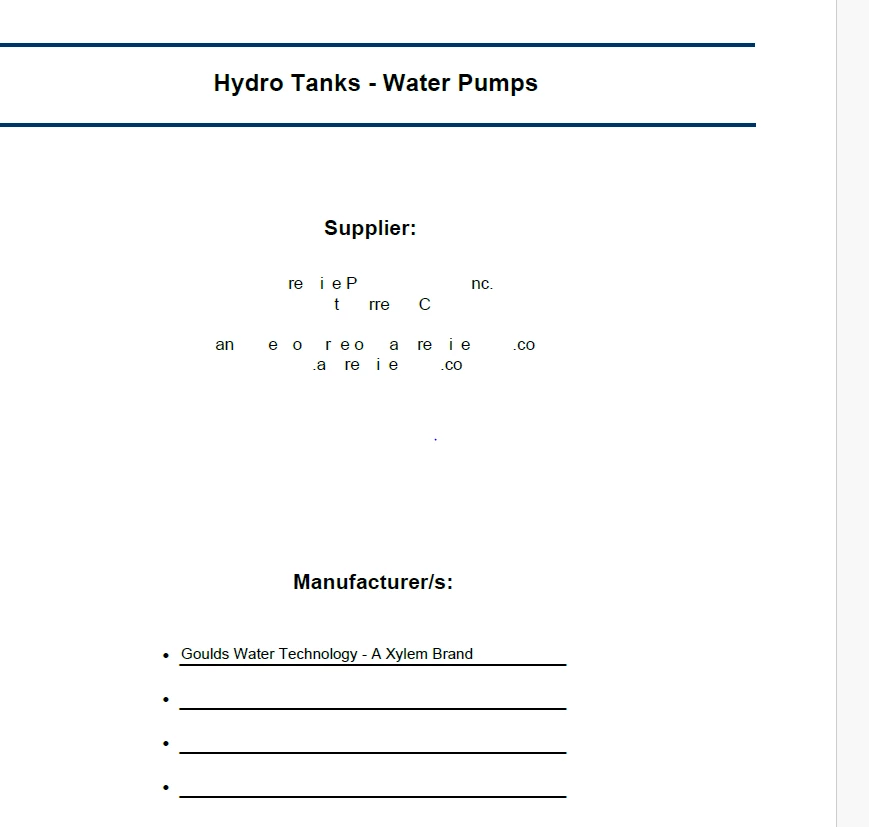
 I keep having the same issues with Adobe. I like to create my own templates to make my job more efficient, but for some reason when I do, as soon as I save it, the font goes all wonky, and somtimes deletes random letters all together. Example shown below. 


Please help 🙂 

Correct answer Tariq Dar

Hi @StephanieAIM,


Thanks for bringing this up. Font—related issues can be frustrating, especially when they affect your custom templates or saved documents. Let’s try to narrow this down and get things working consistently again.


Here are a few things to check and try:


1. Check if Fonts Are Embedded Properly

If you’re editing or saving a PDF where fonts weren’t embedded originally, Acrobat may substitute them.

  • Open the PDF in Acrobat

  • Go to File > Properties > Fonts

  • Check if the fonts listed show as “Embedded” or “Embedded Subset”

  • If not embedded, Acrobat may replace them with available system fonts


2. If you’re editing text and fonts are changing, you might want to check:

  • Preferences > Content Editing > Font Options

  • Make sure Acrobat is defaulting to a font you want and that the fonts you’re using are installed and accessible on your system.


3. Confirm Fonts Are Installed Locally

Make sure the original fonts you’re using in your templates are:

  • Installed on your machine

  • Not restricted by licensing (some fonts cannot be embedded)

  • Not being pulled from a network or external font manager that might cause delays or substitution


4. Test in a Clean Environment

Try creating a new test document using the same fonts. Save and reopen it to check if the issue repeats. This helps determine if it’s document-specific or a broader issue with font handling.


Also, you can check about Font Embedding: https://helpx.adobe.com/acrobat/using/pdf-fonts.html


Looking forward to your reply so we can assist you more specifically.


~Tariq

1 reply

Tariq DarCorrect answer
Legend
April 30, 2025

Hi @StephanieAIM,


Thanks for bringing this up. Font—related issues can be frustrating, especially when they affect your custom templates or saved documents. Let’s try to narrow this down and get things working consistently again.


Here are a few things to check and try:


1. Check if Fonts Are Embedded Properly

If you’re editing or saving a PDF where fonts weren’t embedded originally, Acrobat may substitute them.

  • Open the PDF in Acrobat

  • Go to File > Properties > Fonts

  • Check if the fonts listed show as “Embedded” or “Embedded Subset”

  • If not embedded, Acrobat may replace them with available system fonts


2. If you’re editing text and fonts are changing, you might want to check:

  • Preferences > Content Editing > Font Options

  • Make sure Acrobat is defaulting to a font you want and that the fonts you’re using are installed and accessible on your system.


3. Confirm Fonts Are Installed Locally

Make sure the original fonts you’re using in your templates are:

  • Installed on your machine

  • Not restricted by licensing (some fonts cannot be embedded)

  • Not being pulled from a network or external font manager that might cause delays or substitution


4. Test in a Clean Environment

Try creating a new test document using the same fonts. Save and reopen it to check if the issue repeats. This helps determine if it’s document-specific or a broader issue with font handling.


Also, you can check about Font Embedding: https://helpx.adobe.com/acrobat/using/pdf-fonts.html


Looking forward to your reply so we can assist you more specifically.


~Tariq

Participant
April 30, 2025

Hello Tariq,


Thank you so much for your reply! I will try these steps you have listed and hopefully one of them is the fix! I will reach back out once I have gone through them all. 


Thanks again 🙂 

AnandSri
Legend
May 13, 2025

Hello Stephanie!


I hope you are doing well. Following up to check if you are still experiencing any issues? I hope the above suggestions have worked for you. Feel free to reach out if you need any assistance.


Thanks,

Anand Sri.