
Participant
June 1, 2023
Question

Font not working

  • June 1, 2023
  • 3 replies
  • 1442 views

Having an issue with Albert-Sans font. The font is installed on the Windows 11 laptop, but doens't show up in Adobe. When printing to PDF via Acrobat from PowerPoint the weight of the font it wrong. It is not showing up in the list of fonts not sure that is the issue. 


Insight is appreciated. 


This topic has been closed for replies.

3 replies

Bevi Chagnon - PubCom.com
Legend
June 5, 2023

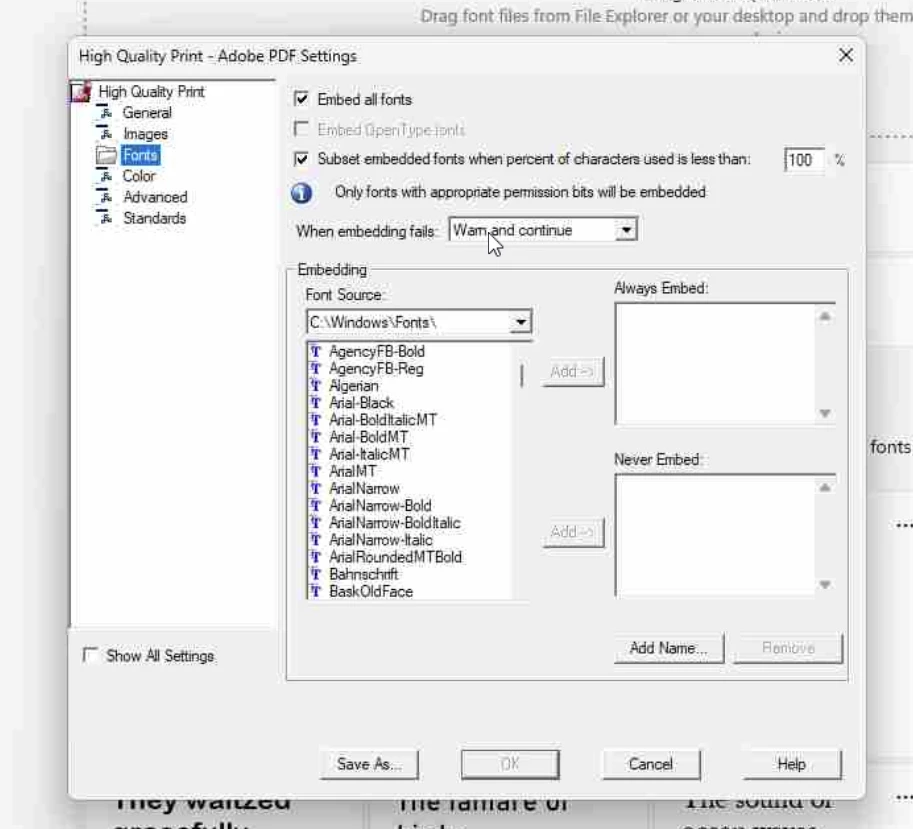
@Lance30226374x31e, your screen capture doesn't show Albert Sans installed in your C:\Windows\Fonts directory, so most likely the font can't be embedded into the PDF.


1. Check your C:\Windows\Fonts  directory and see if the font is listed there.


2. If not, then download a copy of the font family and install it manually into that font directory. You can download the complete family from Google Fonts at https://fonts.google.com/specimen/Albert+Sans


3. After downloading the file, UNzip it to extract the individual font files. Then drag the fonts that are inside the Static folder into your C:\Windows\Fonts folder and Windows will automatically install them on your system.


You might have to reboot your computer in order for the system to see the new fonts.

Let us know if this corrects the problem.


|    Bevi Chagnon   |  Designer, Trainer, & Technologist for Accessible Documents ||    PubCom |    Classes & Books for Accessible InDesign, PDFs & MS Office |
Participant
June 5, 2023

23.001.20174

Never has worked. New user. 

Created in MS Power point using Albert-Sans. Font is in the Microsoft Font diretory. All Font types seem to be in the Microsoft folder as well. Bold/Regular, etc. 

Eric Dumas
Community Expert
Community Expert
June 2, 2023

Hi, 

Can you confirm the exact version of your software?

Is this a new issue, was it working as expected before an update or upgrade?

Can you indicate how was the file created and let us know the font type used? Type1 fonts are being retired for example (check in your fonts folder of you control panel.)

Some fonts are installed on a computer but do not contain a bold version of the font. Software like MS Word and others simulate the bold effect, but sometimes on export, that information is lost.