


assause
Community Expert
Community Expert
September 25, 2023
Question

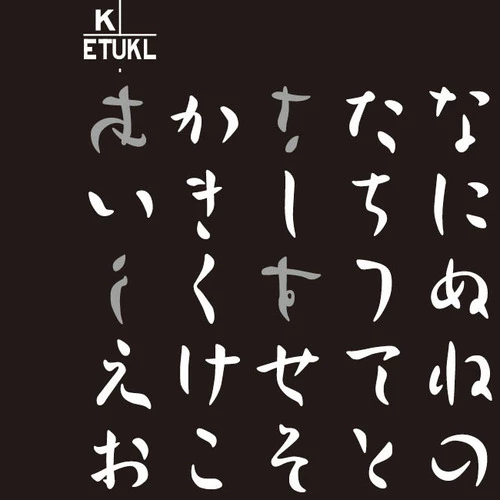
Font thumbnails do not display properly

  • September 25, 2023
  • 2 replies
  • 1429 views

This problem occurs in Windows environment.
Font thumbnails cannot be displayed correctly with the original font.
Please refer to the attached screenshot.
This problem occurs not only with Japanese fonts, but also with English fonts.


This screenshot is from the latest version (6.0.0.571), but it is happening from older versions.
(This is from the very first version when previews were available)


We have not checked in other language environments, so maybe the phenomenon only occurs in Japanese environment.


Original Message (Japanese):

---

Windows環境で発生します。
フォントサムネールについて、本来のフォントで正常に表示できません。
添付のスクリーンショットを参照してください。
日本語フォントに限らず、英語フォントでも発生します。


このスクリーンショットは最新版(6.0.0.571)のものですが、古いバージョンから起きています。
(プレビューが利用できるようになった最初期のバージョンからです)


他の言語環境での確認はしていないので、もしかしたら日本語環境でしか現象は起きないのかもしれません。


This topic has been closed for replies.

2 replies

kglad
Community Expert
Community Expert
November 7, 2023

in the future, to find the best place to post your message, use the list here, https://community.adobe.com/

p.s. i don't think the adobe website, and forums in particular, are easy to navigate, so don't spend a lot of time searching that forum list. do your best and we'll move the post (like this one has already been moved) if it helps you get responses.


<"moved from cc desktop bugs">
assause
Community Expert
assauseCommunity ExpertAuthor
Community Expert
November 7, 2023

The original post was reporting a bug as a CC desktop, so if you want to move it, the proper process is to split it up.

Ellen33406355efpc
Participant
November 7, 2023

I can concur that some Adobe fonts also do not print to PDF in the Microsoft format.  It displays as gibberish.

Do you know how to fix this?