


Participating Frequently
February 5, 2026
Question

Fonts not found when opening document

  • February 5, 2026
  • 3 replies
  • 140 views

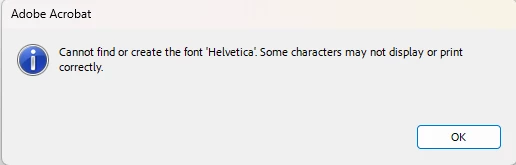
We have been creating and sending adobe documents for signature on our accounting system but when they come back signed and we open them it is saying Helvetica and Ariel fonts cannot be found.  Once opened the documents are appearing blank.  How do we fix this? Thanks


    3 replies

    AnandSri
    Legend
    February 11, 2026

    Hello ​@defaultixp247q3vk0c 


    I hope you are doing well, and thanks for reaching out. We’re sorry for the trouble you had.


    This issue occurs because the PDF returned from the e‑signature workflow does not have the fonts embedded. When Acrobat cannot find or substitute the required fonts (for example, Helvetica or Arial), the content may display incorrectly or appear completely blank. Adobe confirms that PDFs relying on system fonts instead of embedded fonts can fail on other machines, especially after automated processing such as digital signing.

    • Open the PDF in Adobe Acrobat
    • Go to Menu > Properties > Fonts
    • Check whether Helvetica / Arial are listed as Embedded or Embedded Subset.

    If a font is not listed as embedded, Acrobat depends on the local system to supply it, which is why the file opens blank on some computers.

    Also, ensure that you are on the latest build of Acrobat: 25.001.21184 Planned update. Feb 06, 2026. Check for any pending updates by navigating to Menu > Help> Check for Updates. Install the updates, restart the app and the machine, and try again.


    Let us know how it goes.

    Regards,

    Anand Sri.

    Participant
    February 11, 2026

    Recreate and resend the documents with fonts embedded (Export/Save as PDF → enable Embed fonts), or change the document to a standard embedded font before sending for signature.
    Also make sure Adobe Acrobat/Reader is updated.

    Once fonts are embedded, the signed files will open normally.

    Dave Creamer of IDEAS
    Community Expert
    Community Expert
    February 5, 2026

    What platform are you opening the form on? 

    What platform was the form created on  and how long ago was it created?


    David Creamer: Community Expert (ACI and ACE 1995-2023)
    joelcci
    Participant
    February 5, 2026

    I’m seeing the same issue with a different font and multiple fonts.  Windows 11 Pro.  Both OS and Adobe Reader DC are up to date.