Form created in InDesign with strikethrough text, behaves oddly in Acrobat
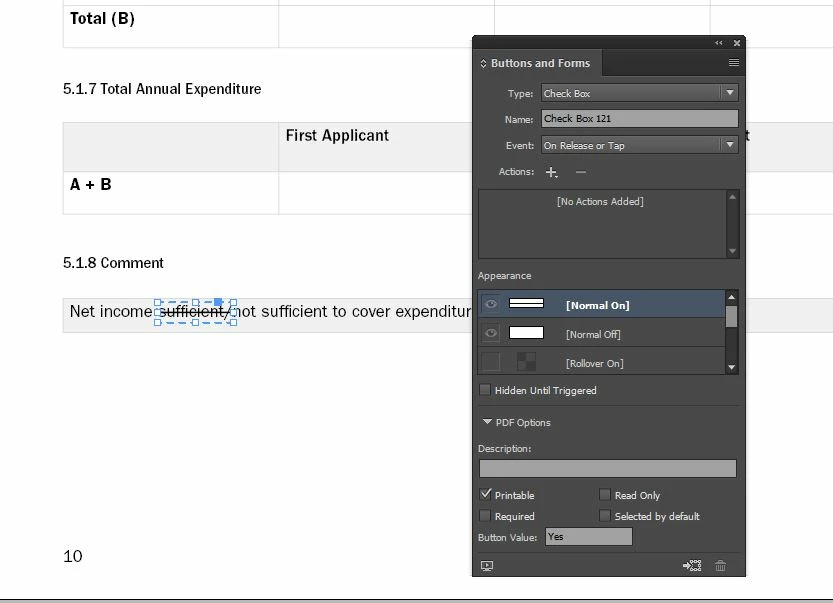
I've created a variety of forms in InDesign, and one of the features needed on the PDF is the ability to cross out certain bits of text ('Delete as appropriate', etc). I've done this using checkboxes and radioboxes in InDesign, replacing the check with a line in the on/off state, as shown:
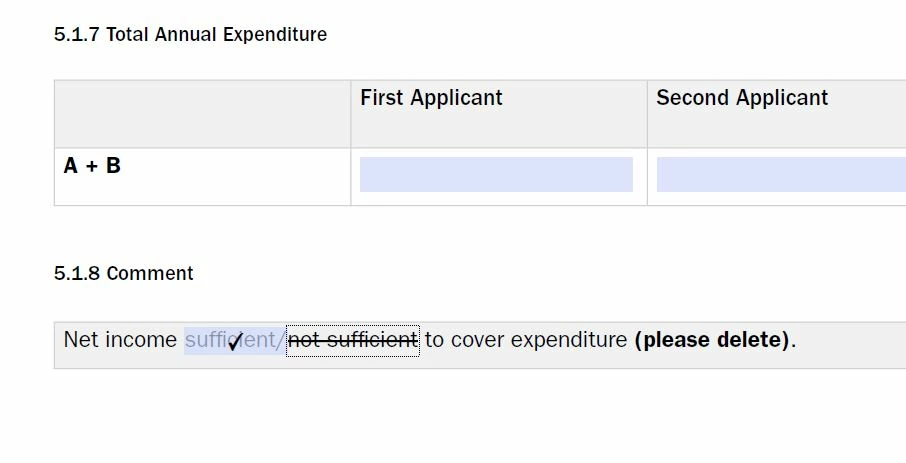
This is technically functioning in Acrobat/Reader - however, if Highlight Fields is turned on (which ideally it needs to be, as there's a lot to fill out), Acrobat is showing a picture of a checkbox instead of a line as soon as the user has clicked away from it. In the image below, I have clicked on 'sufficient' to cross it out, then clicked on 'not sufficient' - you can see the 'sufficient' line has been replaced with a tick. This is particularly confusing as it might imply to a user that they are selecting that option, rather than crossing it out.
Is there any way to stop Acrobat from doing this? (Preferably using InDesign – these forms are updated frequently, so any changes made in Acrobat would need to be replicated every time it was updated, which I don't have capacity to do. This is why I make the form fields in InDesign and not Acrobat.)
Thanks in advance!
 AdChoices