


Known Participant
May 8, 2026
Answered

Form field deselecting radio button
  • May 8, 2026
  • 3 replies
  • 31 views

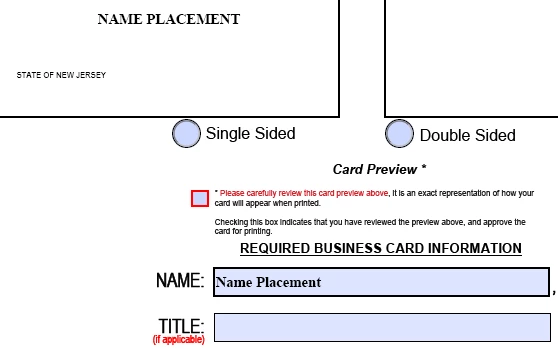
Have a radio button when triggered to display a business card as either single or double sided. When single sided is selected, it displays as it should. Moment information is keyed into the fields below it; the single sided button deselects itself. Double Sided is unaffected and are linked to each other.


Any idea as to what may cause this?

The radios do trigger hidden fields where some of the fields below would display in a cards preview window.

    Correct answer PDF Automation Station

    The last line of the script of the field Back1 on page 2 will run after all the other test in the script are false.  They will always be false because the test includes that the radio button field “Sides” is equal to 2 sided.  The last line clears the radio button when all other tests fail.  BTW, to set the buttons value to clear it you should set it to “Off” not “”.

    3 replies

    Meenakshi0101
    Community Manager
    Community Manager
    May 8, 2026

    Hi Miguel29015202vlzl,


    Thank you for reaching out, and sorry for the trouble caused.


    If you are the owner of the document, please try the following:

    • Go to All Tools > Prepare a Form.
    • Click the radio button that is “deselecting”.
    • Open Properties
    • Under General, look at Name (All radio buttons that belong to one question must share the same Name, but different questions must use different Names).
    • Ensure each option has a unique “Export Value”. Within the same group (same Name), each radio option should have a distinct value.
    1. Open Properties > Options.
    2. Set Radio Button Choice (Export Value) uniquely (e.g., Yes, No)

    Check if this helps.


    If you still experience an issue, please share the PDF form with us so we can check it. The one you shared does not show all the options shared on the screen.

    Let us know if you need any help.


    Thanks,

    Meenakshi

    Known Participant
    May 8, 2026

    Both choices have a unique option. Both buttons are not supposed to be triggered by anything. They are the starting points of the design. Form has been attached. 

    Meenakshi0101
    Community Manager
    Community Manager
    May 8, 2026

    Hi Miguel29015202vlzl,


    Thank you for sharing the information.


    Please allow us some time to check this form. We will get back with more information.

    We appreciate your patience.


    Thanks,

    Meenakshi

    Known Participant
    May 8, 2026
    PDF Automation Station
    Community Expert
    Community Expert
    May 8, 2026

    Did you upload the right form?  It doesn’t match your screenshot.

    Known Participant
    May 8, 2026

    It's possible I did not save before uploading. This was just saved.

    PDF Automation Station
    Community Expert
    Community Expert
    May 8, 2026

    Can you upload the form?

    Known Participant
    May 8, 2026

    uploaded

    PDF Automation Station
    Community Expert
    Community Expert
    May 8, 2026

    It’s the same form.  There is no single sided/double sided radio buttons as displayed in your original question.