
Participant
July 25, 2024
Answered

Form field that fills from bottom to top

  • July 25, 2024
  • 1 reply
  • 1535 views

I have a unique situation that is forcing me to fill a text box that starts at the bottom and fills going up. The text is being pulled from another form field that auto fills with other form fields. Below is the example ive been tasked to fix. The sample title runs into the email placed in the same row. I would like the "Sample job title that is really long" to go to a second line which I've found is possible. The text would need to move up instead of flowing down since it flows outside of the bounding box. The owner of this image does not want to move the text around to accomidate the issue.
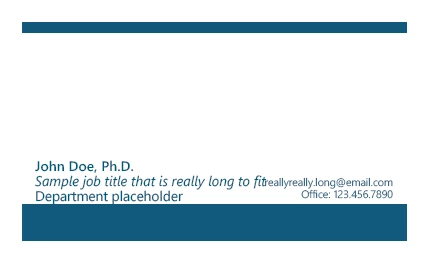
 

 Please be patient with my ignorance. The original maker of this document has custom coding that it calculates. Im slowly teaching myself how to read and understand what each string is doing.
This topic has been closed for replies.
Correct answer try67

The only way I'm familiar with of doing it is the following:

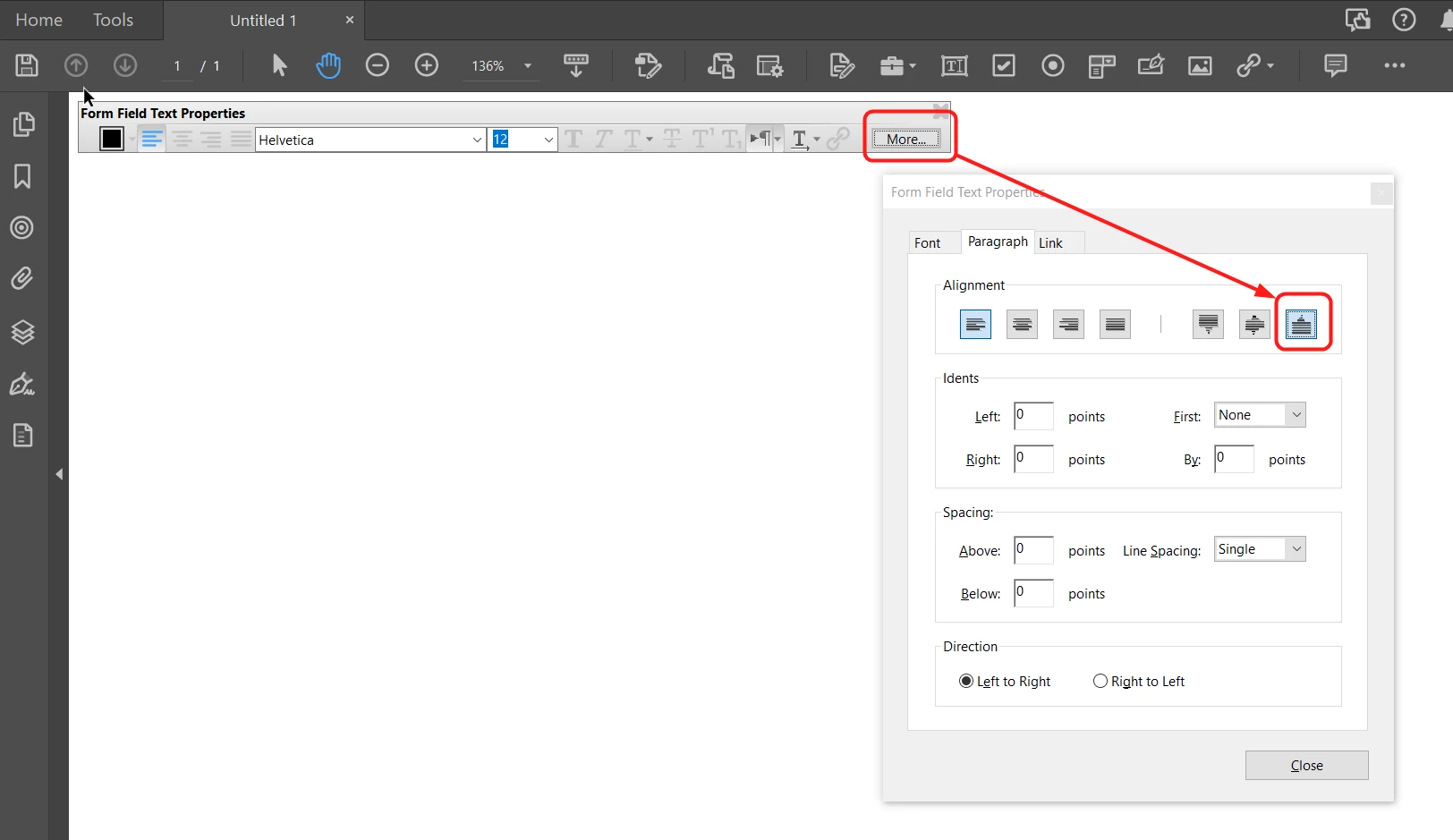
- In Prepare Form mode, go to the field's Properties and under Options set it as having Rich Text Formatting. Of course, it also needs to be set as Multiline.

- Exit Prepare form and click into the field. Press Ctrl+E to open the Form Field Text Properties floating toolbar.

- Click "More...".

- Under the Paragraph tab, set Alignment to Text Below, then click on Close:


Enter text into the field and it will work as you described. HOWEVER, if you clear the contents of the field (and exit it) it will revert back to the original settings with the text at the top.


1 reply

try67
Community Expert
try67Community ExpertCorrect answer
Community Expert
July 25, 2024

The only way I'm familiar with of doing it is the following:

- In Prepare Form mode, go to the field's Properties and under Options set it as having Rich Text Formatting. Of course, it also needs to be set as Multiline.

- Exit Prepare form and click into the field. Press Ctrl+E to open the Form Field Text Properties floating toolbar.

- Click "More...".

- Under the Paragraph tab, set Alignment to Text Below, then click on Close:


Enter text into the field and it will work as you described. HOWEVER, if you clear the contents of the field (and exit it) it will revert back to the original settings with the text at the top.


Participant
July 25, 2024

Unfortunatly i dont see this tab as an option. I did find the alignment but this doesnt give me that option. Can you confirm the version you are using? 

PDF Automation Station
Community Expert
Community Expert
July 25, 2024

Close Prepare form and click the More button on the floating toolbar.