
nimya88404583
Participant
November 21, 2019
Answered

Form field unlocked on Signature. How to unlock the field using javascript? HELP!!!!

  • November 21, 2019
  • 5 replies
  • 4522 views

Hi everyone,

I created a student evaluation form fillable in pdf. The digital signature has a custom script after the form is signed. However, the code doesn't execute when used at the user's end. It works as expected on my end and on different devices with different Adobe versions.


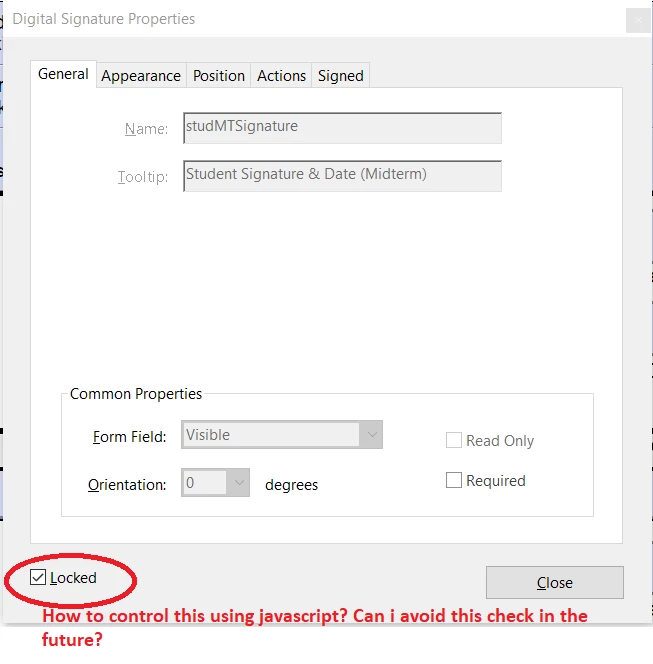
I asked the students to send me the pdf file, and when I checked I found that the digital signature form field is Locked. It doesn't allow me to make any change to the form field and somehow is also preventing the code to be executed. Please refer to the image.


Is there any way to unlock the form field? Can we avoid this situation by using a script?


PLEASE HELP!!!!!
This topic has been closed for replies.
Correct answer nimya88404583

You were all right. Signature field will be locked to avoid any changes to the field.


However, the issue here regarding the statement app.execMenuItem("Save"); which does not work. Adobe doesn't give an error because the function exists, but it doesn't work.

5 replies

nimya88404583
nimya88404583AuthorCorrect answer
Participant
November 27, 2019

You were all right. Signature field will be locked to avoid any changes to the field.


However, the issue here regarding the statement app.execMenuItem("Save"); which does not work. Adobe doesn't give an error because the function exists, but it doesn't work.

try67
Community Expert
Community Expert
November 27, 2019

Correct, that will not work. You can use "SaveAs", though, but that will cause the Save As dialog to appear.

In order to silently save a file you must install a script file on the local computer of each user.

nimya88404583
Participant
November 22, 2019

Thank you all for reverting back promptly.


I went back and checked in other forms. It is true that the signature field will lock itself after signed. But somehow the custom javascript or even the "Mark as readonly" actions are being skipped. I will update my question. 


ETA - It seems I can't update my question.

The Signed action somehow is not executed on Signature. And the field is not being marked as readonly. Is there any reason why a code can be skipped?

JR Boulay
Community Expert
Community Expert
November 22, 2019

The "locked" property is just made to avoid any unwanted field displacement on the page.

I guess you are talking about the "Read only" property.

Acrobate du PDF, InDesigner et Photoshopographe
try67
Community Expert
Community Expert
November 22, 2019

This "locked" property can't be changed using a script. You should be able to simply un-tick it, though.

I don't think a Digital Signature field would lock a field like that, as it's pretty much meaningless. All it does is prevent you (or someone else) from accidentally edit the field's properties.

AkanchhaS8194121
Legend
November 22, 2019

Hey there!


As per the explanation given, the digital signature has a custom script after the form is signed. Once form is signed, its properties are locked and any further changes wont be implemented. 


Since you are the one who created this form, you must check in the form field's properties by reopening the form in "Prepare Form" mode. If its not allowing to make changes, then you have to recreate the form.


Thanks,

Akanchha