Participant
March 13, 2024
Answered

Form fields are linked when spawning page template multiple times

  • March 13, 2024
  • 2 replies
  • 1417 views

I have a PDF form that has a button, which spawns a new page from the hidden template. This is the code and I have a page template named Test.

this.getTemplate("Test").spawn({nPage: 1, bRename: true, bOverlay: false});

This works as expected and spawns a page and the fields are not linked (the values entered aren't copied) between the spawned page and the page template. The issue is that if I click this button for a second time, the form fields are linked to the ones on the first page. Also the fields are not renamed properly.


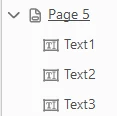
Field names on the "Test" template page: 

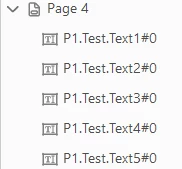
Field names on the first spawned page:

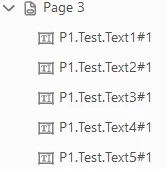
Field names on the second spawned page:


As far as i know the naming should not be like this.

This topic has been closed for replies.
Correct answer Patrick S

So I implemented try67's advice and this is the end product. I am just going to leave it here if anyone else bumps into the same issue and maybe this will save them some time (and frustration 🙂 ).


I also looked up how to save a variable for later (if the PDF is closed and reopened). This is how you can do it, it basically just saved the variable into the metedata. So enter this into the console to set the variable:

this.info.var_counter = 0;


This is the code. I put it as an action of the button (named Button_1), and set the page template. 

1. At the click of the button, all of the previously spawned pages are going to move to the end of the document.

2. A new page is going to spawn with unique field names

3. All of the pages are going to get moved back (to the next page after the page with the button)

4. The amount of total spawned pages get saved as a variable into the metadata

// the button that you click
button_name = "Button_1"
// name of page template
template_name = "template_name"

// tracking amount of pages that have been spawned already
var counter = this.info.var_counter

// we move all the pages to the end of the document
for (i = 0; i < counter; i++) {
    // moving the specific page (the one after the button)
    this.movePage(this.getField(button_name).page + 1);
}

// spawning a new page from template
this.getTemplate(template_name).spawn({nPage: this.numPages, bRename: true, bOverlay: false});

// we increase the spawned page counter
counter++

// moving all the pages back to where they should be
for (i = 0; i < counter; i++) {
    // moving the page after the button
    this.movePage(this.numPages - 1, this.getField(button_name).page)
}

// we save the amount of spawned pages for future use
this.info.var_counter = counter;


Hope this helps!

2 replies

Patrick SAuthorCorrect answer
Participant
March 13, 2024

So I implemented try67's advice and this is the end product. I am just going to leave it here if anyone else bumps into the same issue and maybe this will save them some time (and frustration 🙂 ).


I also looked up how to save a variable for later (if the PDF is closed and reopened). This is how you can do it, it basically just saved the variable into the metedata. So enter this into the console to set the variable:

this.info.var_counter = 0;


This is the code. I put it as an action of the button (named Button_1), and set the page template. 

1. At the click of the button, all of the previously spawned pages are going to move to the end of the document.

2. A new page is going to spawn with unique field names

3. All of the pages are going to get moved back (to the next page after the page with the button)

4. The amount of total spawned pages get saved as a variable into the metadata

// the button that you click
button_name = "Button_1"
// name of page template
template_name = "template_name"

// tracking amount of pages that have been spawned already
var counter = this.info.var_counter

// we move all the pages to the end of the document
for (i = 0; i < counter; i++) {
    // moving the specific page (the one after the button)
    this.movePage(this.getField(button_name).page + 1);
}

// spawning a new page from template
this.getTemplate(template_name).spawn({nPage: this.numPages, bRename: true, bOverlay: false});

// we increase the spawned page counter
counter++

// moving all the pages back to where they should be
for (i = 0; i < counter; i++) {
    // moving the page after the button
    this.movePage(this.numPages - 1, this.getField(button_name).page)
}

// we save the amount of spawned pages for future use
this.info.var_counter = counter;


Hope this helps!
try67
Community Expert
Community Expert
March 13, 2024

This happens when you spawn the Template to the same page number each time, as the new field names are created using the template name, the page number to which it was spawned, and the original field names, and all of those are the same in that scenario, resulting in identical field names.

The solution is to always spawn the template as the last page of the file, and not to delete any spawned pages from the middle, only the end of it.

Patrick SAuthor
Participant
March 13, 2024

Thank you. Makes sense.


The problem is that my spawned templates have to be in the middle of the file. Based on your advice I tried to spawn them at the end and move them, but that still results in the same issue. How could I go about this?

try67
Community Expert
Community Expert
March 13, 2024

You have to keep track of how many pages you spawned and then spawn the new page after the last one.