
Form fields operate very slow when end user enters an action
Hello community! Hope all is well.
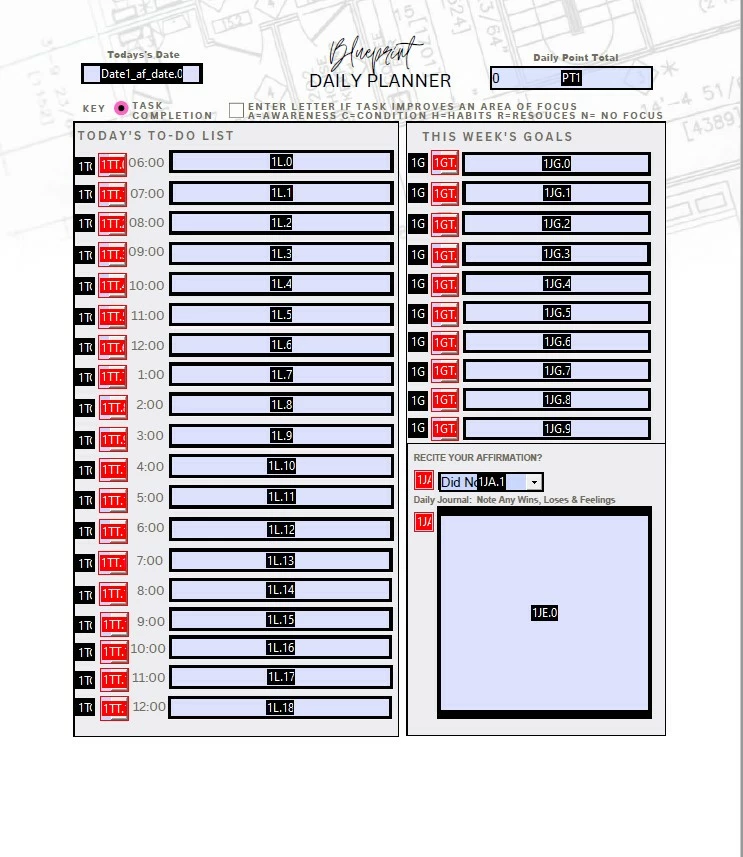
I created a fillable, daily planner with a total on 90 fillable fields, 60 of which need to be calcualted in the box marked, "PT1". The calulation was created by right clicking on "PT1"/properties/calulation and finally, selecting the boxes for the fields that are to be calcualted. After creating 30 pages, with unique form field names, I previewed the file and all of the form fields work and the calculation is correct. HOWEVER, the PDF responds to the enduser's input EXTREMELY SLOW.
After some tireless research I discovered that my issue is likely that the javascript that controls the PDF scans ALL of the fields, each time an input is enter. QUESTIONS:
- Is there a script or a way I can instruct the javascript only to calculate a form field when it is selected by the end user? (I am new to JavaScript and have limited knowledge using it.)
- Did I created the form with bad design logic? Is it likely my design is the issue? If so, what should I do differently before I continue creating additional pages?
- Can I hide form fields on any of the following pages, only triggering them to appear when the prior page is checked as completed? (I would have to create check box I assume., how would I do so?)
I have checked the pdf on multiple devices including mac/pc and have the latest version of Adobe Reader installed. Form responds slow.
Please be specific and detailed with your responses. Treated me like a 5 year old. LOL! (Not really). I've noticed reading through the community that many experts offer help but speak in "techie" without giving clear step by step solutions on how to correct issues.
I would appreciate any support on this issue.


 AdChoices