Participant
February 28, 2018
Answered

Form Fill Create

  • February 28, 2018
  • 2 replies
  • 480 views

I have edited a PDF and saved it as both a word and PDF.  I later went in and edited it to a form (so when someone opens it they can fill in the questions) and when I viewed it during the edit process it was how I wanted it.  After I was done, I saved it under a different name (in case I had to change something later) and when I open that file, it is not giving me the option to fill in the blanks.  Any help would be appreciated!

This topic has been closed for replies.
Correct answer AnandSri

Hello Amyt,

Sorry for the delayed response and inconvenience caused. As per the description above, you created a fillable form, but it's not letting you to enter the details in form fields, Is that correct?

Please check the form fields properties that the option of Read-only is unchecked.
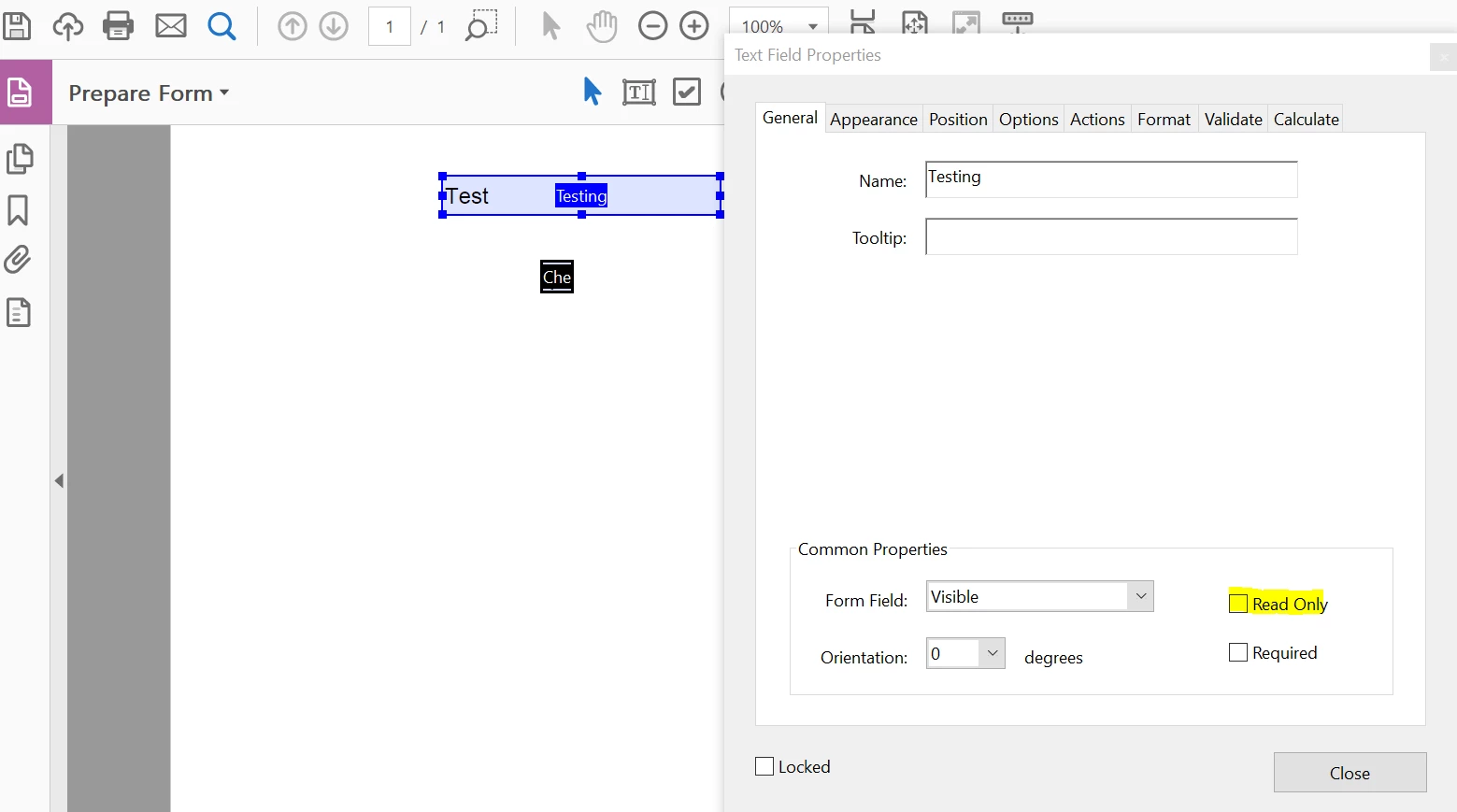
Have you applied any security/restriction in the fillable form? Is it specific to one PDF or with all the PDF? Is it possible to share the PDF file with us? To share the file, please use Adobe Send feature, upload the file, share the link to files via private message only, How Do I Send Private Message

Also, check for any pending updates of Acrobat from help>check for updates, reboot the machine and see if this makes any difference.

You can also refer and try the suggestions from the following Adobe articles Fix the common issues in fillable forms in Acrobat or Reader

Cannot fill in fillable form.

What is the dot version of Acrobat installed? To identify refer to Identify the product and its version for Acrobat and Reader DC

Is it a Mac or Windows machine?

Let us know how it goes and share your findings.

Regards,

Anand Sri.

2 replies

AnandSri
AnandSriCorrect answer
Legend
April 24, 2018

Hello Amyt,

Sorry for the delayed response and inconvenience caused. As per the description above, you created a fillable form, but it's not letting you to enter the details in form fields, Is that correct?

Please check the form fields properties that the option of Read-only is unchecked.

Have you applied any security/restriction in the fillable form? Is it specific to one PDF or with all the PDF? Is it possible to share the PDF file with us? To share the file, please use Adobe Send feature, upload the file, share the link to files via private message only, How Do I Send Private Message

Also, check for any pending updates of Acrobat from help>check for updates, reboot the machine and see if this makes any difference.

You can also refer and try the suggestions from the following Adobe articles Fix the common issues in fillable forms in Acrobat or Reader

Cannot fill in fillable form.

What is the dot version of Acrobat installed? To identify refer to Identify the product and its version for Acrobat and Reader DC

Is it a Mac or Windows machine?

Let us know how it goes and share your findings.

Regards,

Anand Sri.

Kanikas
Legend
February 28, 2018