
Participant
March 30, 2020
Answered

Form Validation for Check Spelling

  • March 30, 2020
  • 1 reply
  • 968 views

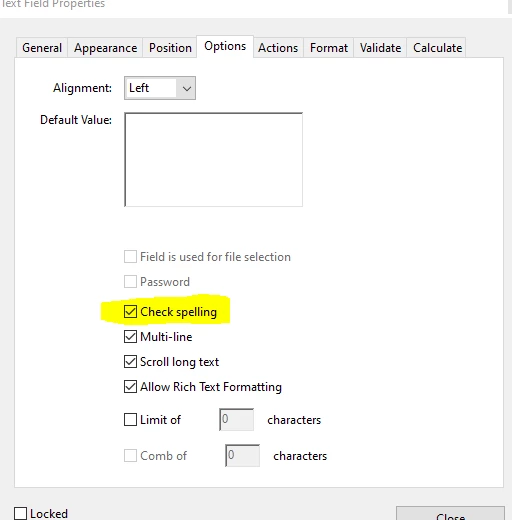
Is it true what I had read that check spelling even if checked in your text field options won't actually work?  Is it only something that works upon hitting a submit button which has to have a form validate script?  Would you be able to help with a script for form fields to check spelling if that selection in options doesn't appear to work?
 

This topic has been closed for replies.
Correct answer ls_rbls

Thank you so much!  I wasn't seeing any red underlines on the form I created if I typed in a word wrong within a text field box that I'd formatted to check spelling. Maybe it's my Adobe setup? Thanks again.


Yes , you're very welcome.


Just remember, that as you type inside the text field you won't see the red underline, even if you hit enter to submit the input.


You will only see the red underline when you left-click once inside of the text field with your mouse. And right-click inside the text field to open  the spelling suggestions from the context menu.

1 reply

ls_rbls
Community Expert
Community Expert
April 7, 2020

Hi,


If I understood your question correctly, you're looking for a spellchecker functionality?


See if you have bumped into this discussion before: https://community.adobe.com/t5/acrobat/spell-checking-in-adobe-acrobat-dc/td-p/9562578?page=1

KRairdenAuthor
Participant
April 7, 2020

Thank you!  I was mainly wondering why spell check doesn't seem to trigger anything if I spell a word wrong when filling out a text field where I've selected the text field to spell check in it's settings.

ls_rbls
Community Expert
Community Expert
April 7, 2020

No it doesn't trigger anything. Is not interactive as you would expect with a word processing application, for example.


You'll only see it work as you type in the field and click on it. 


If the dictionary find a spelling discrepancy it will underline the typed word in red. Is very simple indication that something is wrong with the spelling. Then the user can right-click on the field to select from the context menu a few spelling suggestions for the mispelled word, OR, you can also select "Check Spelling" from the context menu and actually run the spelling wizard.