Participant
Nov 1, 2023 7:46 PM UTC
Answered

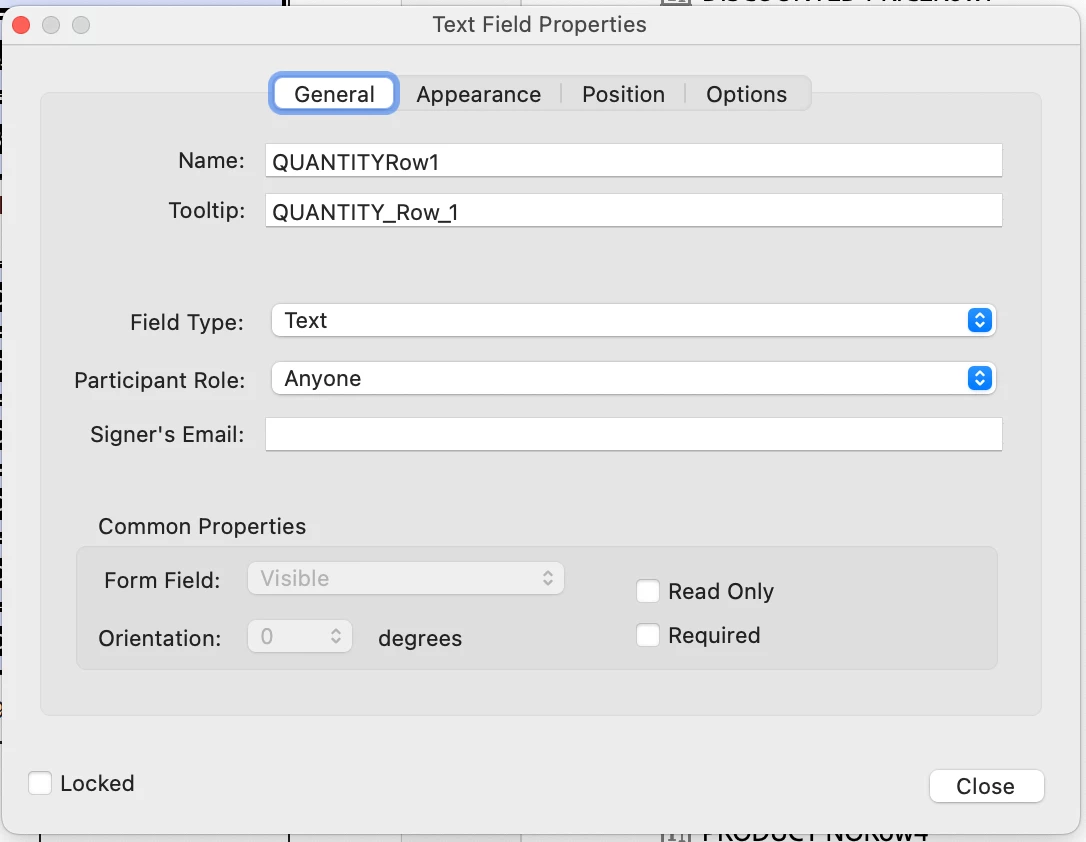
Format Tab Missing

I'm trying to add calculations to my fillable PDF through the "prepare a form" tool but I'm missing the "Format Tab." Any help would be greatly appreciated! I'm running Acrobat Version 23.0 on my Macbook Pro. 
 

This topic is closed to new replies. Start a new post to keep the conversation going.
try67
try67Correct answer
Community Expert
Nov 1, 2023 8:39 PM UTC

Click on Tools - Prepare Form and then click on "More" at the right side of the window and then on "Revert to Acrobat Form". In the future, do not tick the box that says "This document requires signatures" when creating the form, as that converts the form to an Adobe Sign document.

2 replies

try67
Community Expert
try67Community ExpertCorrect answer
Community Expert
Nov 1, 2023 8:39 PM UTC

Click on Tools - Prepare Form and then click on "More" at the right side of the window and then on "Revert to Acrobat Form". In the future, do not tick the box that says "This document requires signatures" when creating the form, as that converts the form to an Adobe Sign document.

Translate
Participant
Nov 2, 2023 1:27 AM UTC

That worked! Thank you!! I greatly appreciate your help!

Translate