
jimb84755305
Participating Frequently
December 13, 2018
Question

Formatting of comments in PDF changes between review rounds

  • December 13, 2018
  • 1 reply
  • 492 views

We are using Shared Review via Sharepoint. Uploading and commenting a document works fine, but when the next person opens up the commented PDF the formatting of the comments changes.

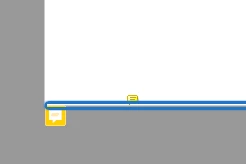
  • All "Sticky Notes" comments are relocated to the bottom left corner of each page in the PDF.
  • All "Highlight Text" comments are relocated to the bottom left corner of each page in the PDF (the highlight also disappears).

See an example below:
Me and my colleagues are all using Adobe Acrboat Pro DC (Cloudbased version).

What could be causing this?

Thankful for your help, using the Shared Review function right now is a guessing game to find out what has been commented on.

This topic has been closed for replies.

1 reply

Meenakshi_Negi
Legend
December 14, 2018

Hi Jimb,

Sorry for the inconvenience caused.

Could you please provide more details about the issue?

As you have mentioned above, the formatting of the comment changes on opening the PDF.

Is it an issue with a particular PDF? Would it be possible to share the file so we can check it on our end?

You may share the file using the steps provided here How to share a file using Adobe Document Cloud

Please share the Adobe Acrobat Pro DC and MS office version used by you.

Are you using Windows machine or Mac? What is the OS version installed on it?

We will be waiting for your response.

Regards,

Meenakshi

jimb84755305
Participating Frequently
December 17, 2018

Hi Meenakshi,

Thank you for your reply! Here are answers to some of your questions:

  • Is it an issue with a particular PDF?

No, this issue arises on all PDFs when the same people in my team review a PDF. I can unfortunately not share a document here since that would show which customer we are working for at the moment.

  • Version of Acrobat Pro DC?

Most team members are using the latest version (19.010.20064) but some team members are on an older version (2019.008.20081).

  • Windows or Mac?

Windows.

  • OS version?

Differs between the different people in the team.

It seems like the problem arises when a person with the older version of Acrobat Pro DC opens up the document. We just did a test where I sent out a document for Shared Review to two of my colleagues. The colleague who opened it first had the same (latest) version of Acrobat Pro DC. To him, the comments looked correct. He added comments, which I then checked. They looked correct as well. Then we asked another colleague with the older version view the document and our comments. He added comments and highlights. When I checked for new comments in the document again, his comments were incorrectly formatted and located in the wrong place in the document.

Could it be that the two Acrobat Pro DC versions aren't compatible?

Best regards,

Jim Bill