
Participant
April 11, 2023
Question

Generating sequential numbered fields for labels

  • April 11, 2023
  • 2 replies
  • 3530 views

Novice user here ..

I can't seem to find exactly what I am looking for through other discussions.

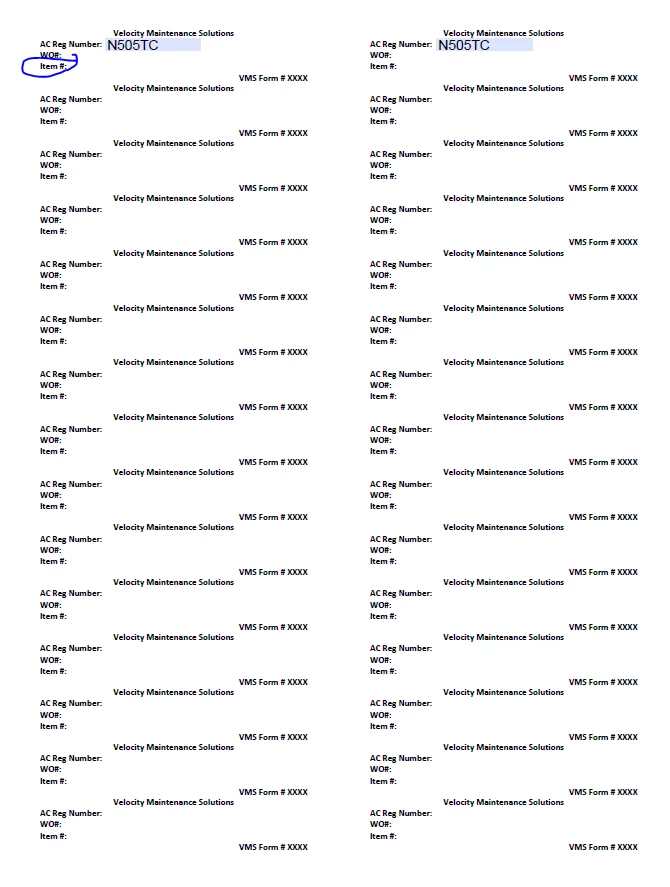
I'd like to create a sequential number layout that will auto-fill through multiple pages (if necessary).

I;d like the Item# to automatically populate throughout the document in sequential order which will match an exteral log.

I've tried javascript and headers and footers, but I'm not getting exactly what I need it to do.
Thank you in advance 🙂


This topic has been closed for replies.

2 replies

Nesa Nurani
Community Expert
Community Expert
April 11, 2023

If your fields are named like this, "ItemNumber.1","ItemNumber.2","ItemNumber.3"...etc you can use this for example in a button and it will populate all fields:

var fields = this.getField("ItemNumber").getArray();
for(var i in fields){
if(fields[i].valueAsString == "")
fields[i].value = fields[i].name.split(".")[1];}

Participant
April 11, 2023

Thank you! I think I tried this with the original javascript I found in another thread, but the command wasn't exactly what I needed.

Can you clarify what you mean by "in a button" and it will populate in all fields? Do I set the javascript command and it will automatically apply to the fields? Do I put the array of fields in "getArray" for the range?

I have no idea how to apply javascript other than following your instructions.

Nesa Nurani
Community Expert
Community Expert
April 12, 2023

"In a button" it means you place script in Button field under 'Actions' tab as 'Mouse UP' and select 'Run a JavaScript' and paste script there.

So when you click on a button it will populate all fields with name "ItemNumber", that why is important to name fields correctly as "ItemNumber.1" it will split field name at dot and use number to place it as field value.

Even when you add more fields, if you click on the button again it will populate them too.

Inspiring
April 11, 2023

You need to provide some more info.

Where do you get number from, what does trigger number input?

What exactly did you try, photo doesn't tell us much?

Participant
April 11, 2023

I am trying to figure out how to articulate this without being overly confusing.

I do not know what the best way is to input the number to have the sequence start. I started to prepare a form from an online label template.

I created text fields next to the Item # and would like for them to start at 1 in the upper left corner and continue in sequence to the end of the document and have that continue to multiple pages (if necessary). We may not always need multiple pages of these labels.

So, basically I need the first page of Item #s to go from 1-30. Page 2 would be 31+ and so on.

I found a thread using javascript, but I do not fully understand how to apply the javascript to fields to have it work properly. I also don't know that this script applies to exactly what I need it to do.

Another user wanted pages to save in sequence after the master form was closed.

var num = this.getField("ItemNumber");num.value = Number(num.value)+1;num.defaultValue = num.value;


I know how to copy and paste text fields to have the data populate in multiple areas at once. I'd like to be able to follow the same process but have the numbering system add 1 counting up in each Item # field.

Inspiring
April 11, 2023

You want to populate all fields at once or one by one with a button click or something else?