



tinylittlearms
Participant
May 27, 2026
Question

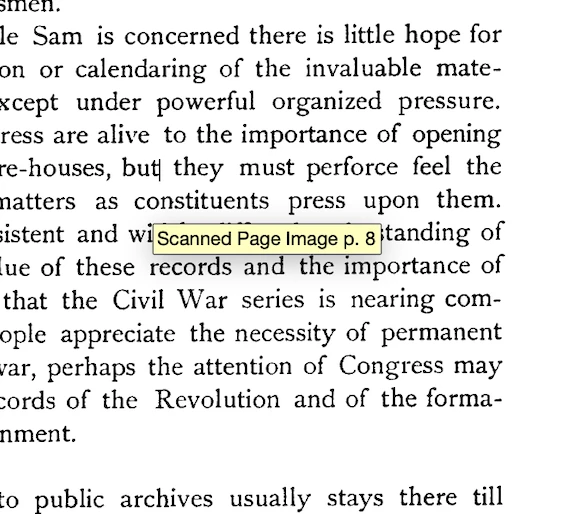
Get rid of yellow box displaying page numbers under cursor

  • May 27, 2026
  • 2 replies
  • 18 views

Whenever I hover over certain documents, I get this weird pop-up showing the page number in the bottom right corner. It sometimes looks like this; sometimes just the page number. I am using old acrobat for viewing pdfs and have “enable text indicators and tooltips” turned off. It seems to happen only with documents that I have converted into searchable/editable text. It happens with any tool selected, but seems to go away when I move my cursor off of the page.


    2 replies

    tinylittlearms
    Participant
    May 28, 2026

    I managed to fix it by running “recognize text” a second time. I think I will just begin to do that from now on.

    Meenakshi0101
    Community Manager
    Community Manager
    May 28, 2026

    Hi tinylittlearms,


    Thank you for reaching out.


    Please try the following steps to see if it helps:

    • Open Adobe Acrobat / Reader

    • Go to Menu > Preferences 

    • Select General from the left panel

    • Look for the option: show page actions on hover (requires relaunch)

    • Uncheck this option.

    • Click OK

    • Relaunch the Acrobat.

    Let us know how it goes.


    Thanks,

    Meenakshi

    tinylittlearms
    Participant
    May 28, 2026

    I can’t seem to find that option in settings. This is what my menu looks like 


    Meenakshi0101
    Community Manager
    Community Manager
    May 29, 2026

    Hi tinylittlearms,


    Thank you for sharing the screenshot.

    Could you please provide the Acrobat and OS version numbers you're currently using? Additionally, could you send the PDF for us to review?


    Thanks,

    Meenakshi