
Getting errors when converting PNG/JPEG files to PDF
This has ALWAYS been an issue since I first started using Adobe Acrobat Pro DC and the web version over a year ago. I try to convert images that are in PNG or JPEG format into a pdf to scroll through my tablet for simplicity and convenience. The app and website produce 2 different errors when converting.
Adobe Acrobat Pro DC - When converting images, there is about a ~70% chance that at least 1 image will produce an error and not convert to pdf and the rest will follow. I receive this pop-up:
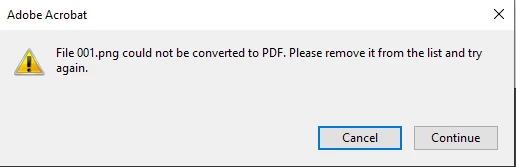
I've scanned and reviewed the images and they're not corrupted, they're 100% fine. I can convert it on the website version of Acrobat just fine. So this tells me it's issued with the faulty app provided to us. Why don't I use the website instead? I also would like to ask why limit the number of images you can convert to around ~100 images? I'm forced to use the app version but it gives me hogwash errors that shouldn't exist. Any reason as to why this error produces in a very good amount of my conversions?
Website Version - After converting for a while, I get to a point where every single image gives me an error and I cannot convert to pdf until I exit the browser and wait 1-2 hours. I don't have an image to show, but if I were to convert 30 PNG/JPEG files after converting for about 20 minutes, every single one of those 30 images produces a red triangle error (last I remember) and I cannot convert anything else unless I exit my browser and wait 1-2 hours. Why does the website version do this? And limit the number of images you're able to convert?
Very frustrated at this point so I apologize for the frantic writing. I tried my best to explain it and would appreciate any help/advice.
Sepcs:
- Windows 10 x64 v21H1 Build: 19043.1645
- Adobe Acrobat Pro DC x32 (22.001.20117)
- Chrome Version 101.0.4951.64 (Official Build) (64-bit)


 AdChoices