Participant
August 7, 2017
Answered

Ghost boxes in Acrobat PDF

  • August 7, 2017
  • 1 reply
  • 2856 views

I have been forced to work in Adobe Pro to edit a document, and I am struggling with it in general. One major issue, however, is the appearance of mysterious blue boxes in the document. This typically happens after I delete an image or a table that was provided in the original document. I have tried everything I can think of to delete them, but with no luck. Here is an example:
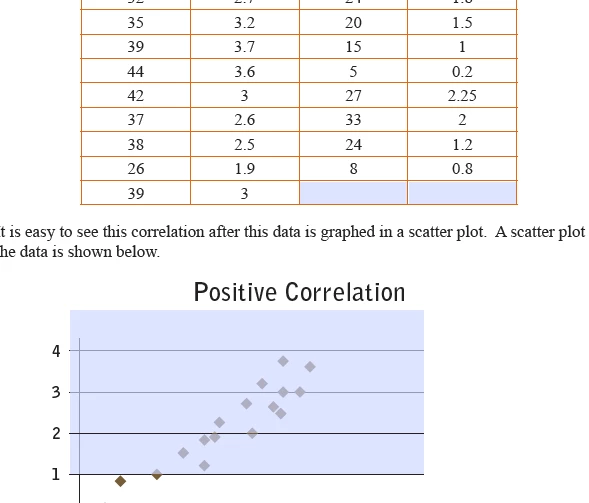
I think they are text boxes you would use if you were making an editable form, but that is not what is being done here. On a tight deadline, so any good ideas are welcome!!

This topic has been closed for replies.
Correct answer PClark127

I actually figured it out just now. For the record, this is what you do:

  * go to edit mode and select Prepare Form. This makes all of the form fields very visible (and able to be edited).

  * right click on the form field and select Delete

simple enough, just not to a rookie Adobe Pro. Now if I can get it to stop crashing so much!

1 reply

try67
Community Expert
Community Expert
August 7, 2017

Looks like form fields. What do you see if you go to Form Edit mode?

PClark127Author
Participant
August 8, 2017

Thanks for the response. In edit mode, they are not as noticeable, but they cloud the image or text that are running on top of them. They must be form fields because in read mode you can click on them and enter text. How do I get at those to delete them?

PClark127AuthorCorrect answer
Participant
August 8, 2017

I actually figured it out just now. For the record, this is what you do:

  * go to edit mode and select Prepare Form. This makes all of the form fields very visible (and able to be edited).

  * right click on the form field and select Delete

simple enough, just not to a rookie Adobe Pro. Now if I can get it to stop crashing so much!