Answered
Gibberish after editing Acrobat Pro
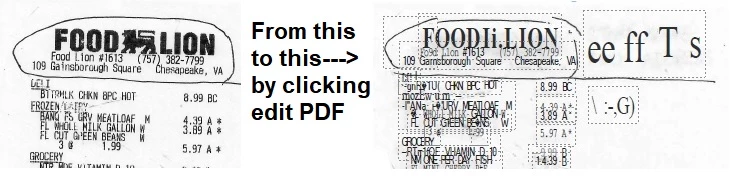
Document needs editing. Click Edit PDF. This is what I always get.
help please......
Lori

Document needs editing. Click Edit PDF. This is what I always get.
help please......
Lori
OK, this can be a bit confusing, but let me take a stab at explaining this:
You have a Food Lion receipt that you took a photo of. Because it's a simple receipt on thin paper, you have the stuff on the backsides, and the paper is not set to white. All of this makes a poor copy image for processing via OCR (Optical Character Recognition).
When you click on a PDF document that is just an image, Acrobat has to convert it to a searchable document via OCR. The poorer the quality of the original document, the poorer the quality of the OCR. For example, if you have "r" and "i" adjacent to each other, it can easily be confused to look like an "n" for the result. That's wrong, but that's what it sees. In addition, if you do not have the original font in your system, Acrobat will switch that font to something else. Ergo, the Food Lion font is completely different.
If you want to do a deep dive in how to scan (not take a photo of a document, but a real scan) to get a better quality result, you can read a blog I wrote for Adobe several years ago.
Meanwhile, what kind of editing did you need to do on a receipt? What were you hoping to achieve? Maybe there's another way to accomplish the same thing.
Already have an account? Login
No account yet? Create an account
Enter your E-mail address. We'll send you an e-mail with instructions to reset your password.


 AdChoices