
dakiser1
Participating Frequently
March 9, 2022
Answered

GlobalSign GCC R6 AATL CA additional PIN required for M1 Mac on Monterey?

  • March 9, 2022
  • 4 replies
  • 8254 views

I am getting an additional PIN request for making digital signatures with a usb token on an M1 Mac running the latest version of adobe on MacOS Monterey.  The following display box is the additional request that I only get on MacOS Monterey (windows 10 and MacOS Big Sur do not require this).
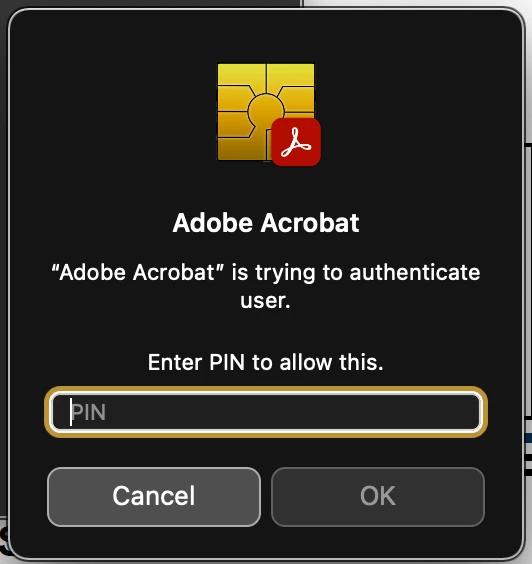
 The PIN is not my computer admin password, adobe password, or my token password.  Please advise what this PIN is or how to reset.

This topic has been closed for replies.
Correct answer Mihai29781665gk4j

Hi guys,


After several attempts posted here, I can tell you that the only option that worked is the one with uninstalling and then installing the certificate in Adobe. The steps for this can be seen here:

https://www.certsign.ro/en/support/error-when-signing-pdfs-with-adobe-acrobat-reader-dc/


The title of the article does not strictly refer to this error, but it definitely solves it.


Greetings,

4 replies

Mihai29781665gk4jCorrect answer
Participant
May 8, 2023

Hi guys,


After several attempts posted here, I can tell you that the only option that worked is the one with uninstalling and then installing the certificate in Adobe. The steps for this can be seen here:

https://www.certsign.ro/en/support/error-when-signing-pdfs-with-adobe-acrobat-reader-dc/


The title of the article does not strictly refer to this error, but it definitely solves it.


Greetings,

dakiser1
dakiser1Author
Participating Frequently
May 13, 2023

Thank you Mihai.  Following this process revealed that my certificate was logged out.  I thought I had checked this before, but I overlooked that the macOS update may have logged it out.  I will make sure to always check the certificate is logged in, but it is strange that I don't get routed to this automatically when trying to sign, it would be much simpler to keep up with.

Participating Frequently
June 2, 2022

the same problem , unchecking the box is not helping anymore (

Participant
June 2, 2022
No thank you
Adobe Employee
March 11, 2022

Hi @dakiser1 ,


Could you please try to follow below steps and let us know if this helps.

  • Go to Acrobat and open Preferences.
  • Select General from category
  • uncheck the checkbox " Enable native OS Mode for Optimal perforance" and click on OK
  • Restart Acrobat and try the same workflow again.


Thanks,

Prashant.

dakiser1
dakiser1Author
Participating Frequently
March 11, 2022

Prashant,

Thank you very much.  This suggestion of disabling the Native OS Mode for Optimal Performance has resolved the issue.  

Amal.
Community Manager
Community Manager
March 10, 2022

Hi there


Hope you are doing well and sorry to hear that.


Would you mind sharing the version of the Adobe Acrobat/Reader DC you are using? To check the version go to Help > About Acrobat and make sure you have the recent version 22.1.20085 installed. Go to Help > Check for updates and reboot the computer once.


Please check for any missing/pending updates for OS and try updating it. You may also try to create a new test user profile with full admin rights in Win or enable the root account in MAC and try using the application there and check.


Regards

Amal

dakiser1
dakiser1Author
Participating Frequently
March 10, 2022

Thank you Amal,

I believe my OS was updated as recently as last week, it is 12.2.1

I also updated the adobe app earlier this week and it indeed is the version you noted.

I have rebooted after the updates but still get the additional PIN request.  I have not tried setting up a different user account with admin rights though.  I will try that next and report back that may be the fix as I was advised by GlobalSign tech support that it could be a keychain issue.  I may have not noted before, but I already checked with Apple Support and they advised to contact Adobe directly for further resolution, which I believe means they do not feel it is an issue with MacOS 12.2.1

dakiser1
dakiser1Author
Participating Frequently
March 10, 2022

Amal,

I created a new account with admin permissions.  I then performed the digital signing process and had the same result.  My token is recognized, but I am prompted for the separate PIN and my new user account password does not work.  Please advise next steps.  Thank you