Participant
June 21, 2021
Answered

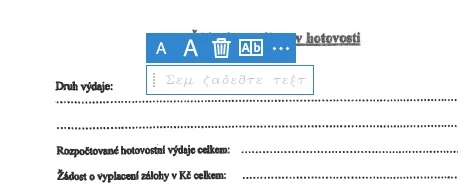
Greek vs. Latin alphabet

  • June 21, 2021
  • 2 replies
  • 1739 views

Hello,
I have a problem inserting text into a pdf document. Why does it insert text in the Greek alphabet? I need a Latin text. I am from the Czech Republic and I have a CZ language everywhere.
Thank you for the advice.

This topic has been closed for replies.
Correct answer AnandSri

Hi @Viktor5C3D 


Thanks for your time and for your cooperation on this.


Hope you are doing well.

The fix is available now with the latest update of Acrobat and Reader DC. Please install the latest update from the following link: https://www.adobe.com/devnet-docs/acrobatetk/tools/ReleaseNotesDC/continuous/dccontinuousjunehotfix2... 

Download the setup, run it, reboot the machine (if possible) and check the app functionality. 


To know more about the latest update, you can refer to this article: 21.005.20054 Optional update, June 23, 2021


Let us know if you still experience any issues.


Regards,
Anand Sri.
2 replies

AnandSri
AnandSriCorrect answer
Legend
June 23, 2021

Hi @Viktor5C3D 


Thanks for your time and for your cooperation on this.


Hope you are doing well.

The fix is available now with the latest update of Acrobat and Reader DC. Please install the latest update from the following link: https://www.adobe.com/devnet-docs/acrobatetk/tools/ReleaseNotesDC/continuous/dccontinuousjunehotfix2... 

Download the setup, run it, reboot the machine (if possible) and check the app functionality. 


To know more about the latest update, you can refer to this article: 21.005.20054 Optional update, June 23, 2021


Let us know if you still experience any issues.


Regards,
Anand Sri.

Amal.
Legend
June 21, 2021

Hi Viktor


Hope you are doing well and sorry for the trouble. As described you are getting the Greek letter when trying to insert text in the PDF via Fill and sign tool


Please try to reboot the computer once and see if that helps.


If it doesn't work, please remove the Adobe Acrobat/Reader DC application and reboot the computer once and reinstall the application using the one of the links below and see if that helps.

Acrobat Reader DC (Freeware application) - https://get.adobe.com/reader/enterprise/

Acrobat Pro DC (Subscription based) - https://helpx.adobe.com/acrobat/kb/acrobat-dc-downloads.html


Regards

Amal

Participant
June 21, 2021

Hello,
I tried to restart the PC - no result. Reinstalling the program is OK until the PC restarts. Then the problem occurs again.