

GatsbyNZ
Known Participant
May 10, 2023
Answered

Grey out fields dependent on drop down list

  • May 10, 2023
  • 1 reply
  • 5986 views

Can anyone please help me with this form?
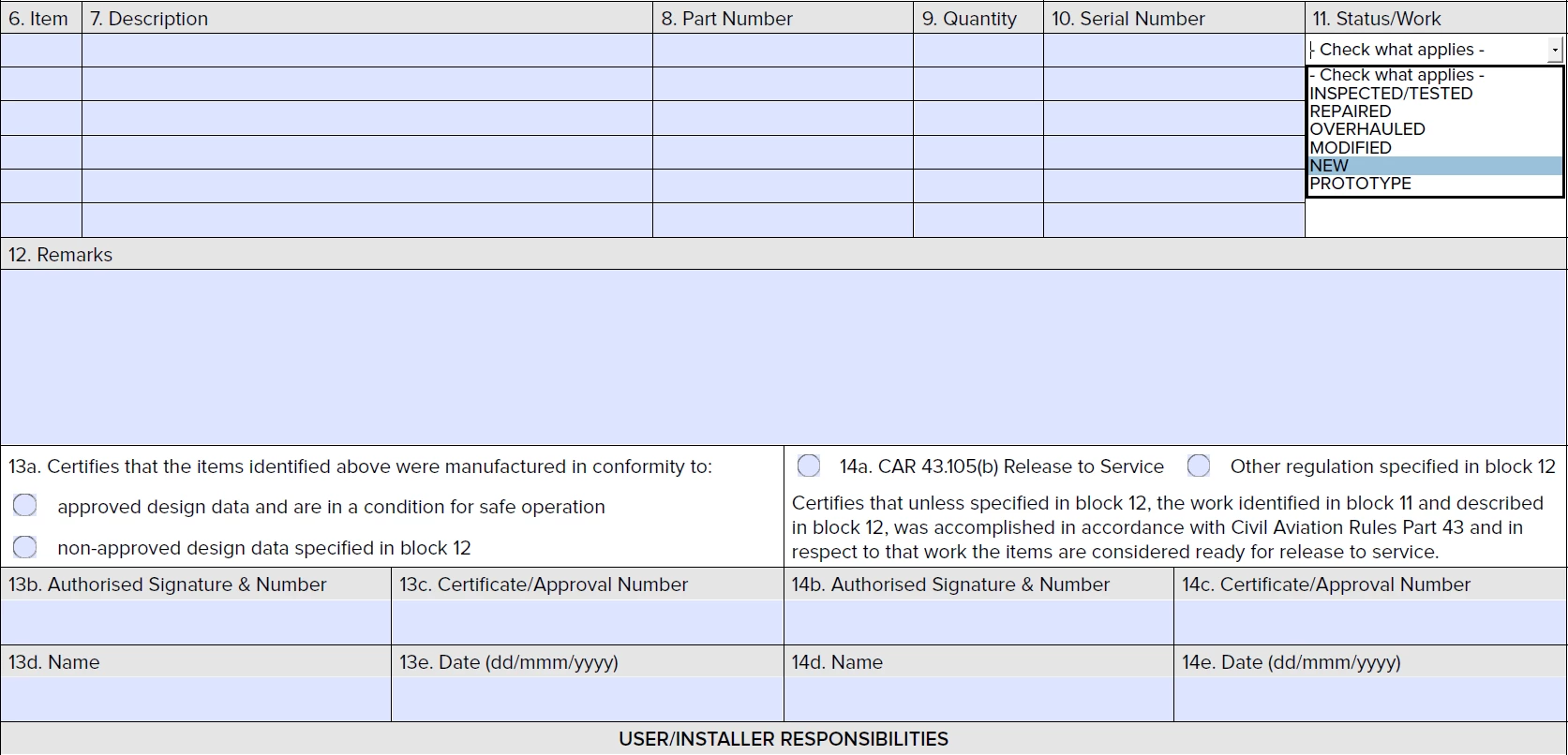
I have a drop-down list on the right hand as you can see, what I want to achieve is when users choose any of the first 4 items on that list, the whole area covering 13a to 13e will gray out, and when users choose the last two items on the list, the right-hand area 14a-14e will gray out.

I am thinking about creating two large text fields to cover the two corresponding areas, but I don't really know how to change the transparency of the fields and how to use the scripts to hide the fields.

Appreciate anyone who can help me out.


Many thanks.

This topic has been closed for replies.
Correct answer try67

Sorry I am script illiterate, can you please show me how to do this.

f.fillColor = (event.value=="options1" or "option2") ? color.ltGray : color.white;
}

Can you also please give me a script for the second question?

Appreciate your help greatly.


You can use something like this:


f.fillColor = (event.value=="Option1" || event.value=="Option2") ? color.ltGray : color.white;
f.readonly = (event.value=="Option1" || event.value=="Option2");

1 reply

Nesa Nurani
Community Expert
Community Expert
May 10, 2023

Do you want to hide an entire section or just set fields in that section to read only?

If latter, write field names for each section.

GatsbyNZ
GatsbyNZAuthor
Known Participant
May 10, 2023

Hi Nesa,

Not to hide (all of the words still need to be there), and not read-only either. I just want the whole section to be grayed out. like putting a layer of 20% grey over it (I know the layer control won't do, because I cannot save them with the document).

Alternatively, every field in the section can have strikethrough, which may be even harder to achieve.


Thanks.

Nesa Nurani
Community Expert
Community Expert
May 10, 2023

You can achieve that with 'Comment' tool by drawing a rectangle on the section you wish to grey out, and selecting grey for 'Fill' color and setting transparency to 20% in comment properties. Then you can use script to show/hide that rectangle.