Participant
November 12, 2020
Question

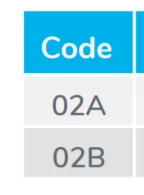
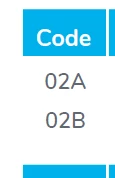
Grey table background not visible

  • November 12, 2020
  • 1 reply
  • 429 views

Hey, I use Adobe Acrobat XI Pro and I have a little issue.

A supplier provide us with datasheet in PDF (just to say I don't have acces to original document).

When I open it with my AAXI Pro, it doesn't show the grey background in table.

It work perfectly on my colleague Adobe or on other application.

I guess it is a parameter issue but I can't find it ... Tried almost everything in display and color management (I just translated the tab name, might not be accurate).


Here is how it look in my AA  (left) and how it should look (right ; screen from another application) :
Thans for your help.

This topic has been closed for replies.

1 reply

try67
Community Expert
Community Expert
November 12, 2020

Can you share the actual file with us?

You can attach it to the original message using the tiny paperclip icon at the bottom when you edit it, or upload it to a file-sharing website (like Dropbox, Google Drive, Adobe Cloud, etc.), generate a share link and then post it here.

Participant
November 12, 2020

Cannot edit my message, I don't know why ...


Luckily, it is a juste a commercial document available on our website so here is a link to download it :

https://www.pierreguerin.com/download/802/data-sheet-bio018-en-primo


Participant
November 12, 2020

And of course, thank you for trying to help me 🙂