


JR Boulay
Community Expert
Community Expert
January 26, 2026
Question

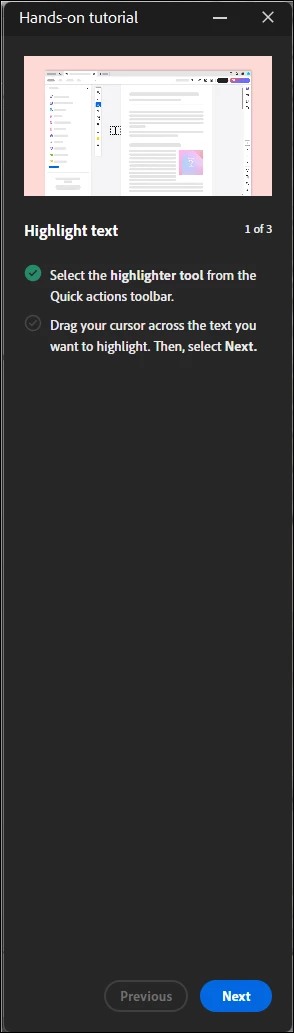
Hands-on tutorial

  • January 26, 2026
  • 3 replies
  • 34 views

Hello,
How can I prevent this beginner's panel from appearing every time I launch Acrobat?
Thank you.

 

Capture_2601261333.png

3 replies

creative explorer
Community Expert
Community Expert
January 26, 2026

@JR Boulay Bsides that you are using the new Acrobat interface, there is a setting in your Prefrences that you can turn this off. Command K (MAC) or Control K (PC), General - Show me messages when I launch Adobe Acrobat (uncheck this!). Click Ok when done. I would also restart Acrobat to make sure this chang sticks...and as well to make sure it works!

creativeexplorer_0-1769455448658.png

Hope that solves your issues!

m
JR Boulay
Community Expert
JR BoulayCommunity ExpertAuthor
Community Expert
January 26, 2026

creative explorer

I always uncheck this option (I have been doing so for over 15 years).
That's not it.
Thank you

Acrobate du PDF, InDesigner et Photoshopographe
JR Boulay
Community Expert
JR BoulayCommunity ExpertAuthor
Community Expert
January 26, 2026

No, I didn't try that.

I don't want to read a tutorial to learn how to highlight a text, even my grandmother know how to do it. 😉

Acrobate du PDF, InDesigner et Photoshopographe
try67
Community Expert
Community Expert
January 26, 2026

Did you try clicking Next until it ends? Usually such windows don't re-appear once you've viewed them.

JR Boulay
Community Expert
JR BoulayCommunity ExpertAuthor
Community Expert
January 26, 2026

try67

I've tried twice, it doesn't work, this panel keeps coming back.

Thank you

Acrobate du PDF, InDesigner et Photoshopographe
try67
Community Expert
Community Expert
January 26, 2026

Sorry to hear it, it was just a guess...