Participant
March 2, 2021
Question

Hard Hyphen are not captured in PDF.

  • March 2, 2021
  • 2 replies
  • 1308 views

When i copy the below hyphenate word ("getting-") and paste into notepad, the hyphen are not captured (refer the screenshot). but, visibily hyphen present in pdf. I have checked various acrobat versions like Acrobat 8 to Acrobat DC. But, all are comes same results only. Please advise why this issue happened in pdf and how to solve this type of issue?.  It would be helpful for our organisation.


I have attached affected page for your reference.
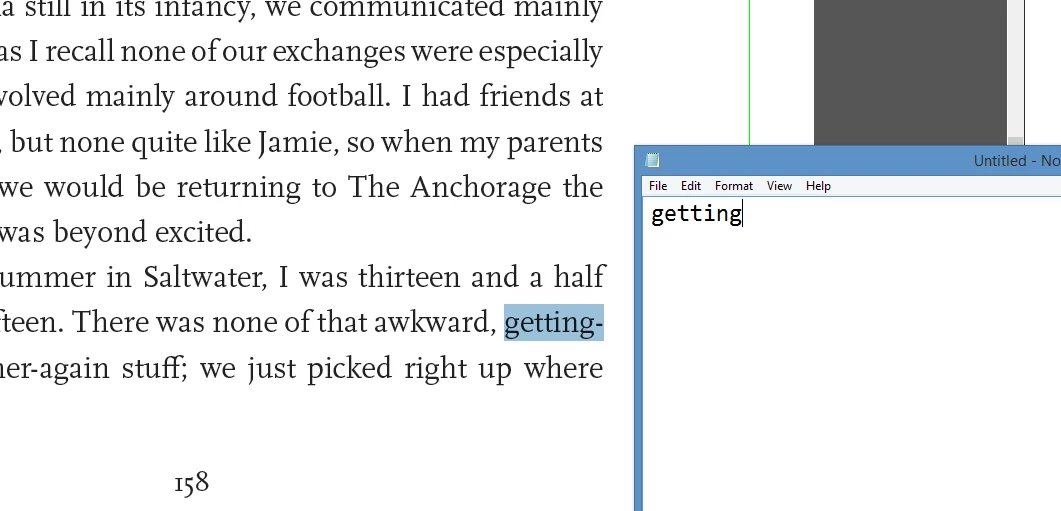


Warm thanks,

Shankari.

This topic has been closed for replies.

2 replies

JR Boulay
Community Expert
Community Expert
March 2, 2021

An hyphen is something "virtual", it's not part of the text.

Acrobate du PDF, InDesigner et Photoshopographe
try67
Community Expert
Community Expert
March 2, 2021

Well, that depends. Hyphens in the middle of a phrase are certainly part of the text, like in "middle-aged", but hyphens that appear at the end of a line are (usually) not, although they can be, like in the example file above.

That's why it's important to encode them correctly.

Participant
October 14, 2024

What is the character to insert in the text to indicate a hard hyphen, and how do we access this character, which will remain when the text is converted into another line with a different width?

try67
Community Expert
Community Expert
March 2, 2021

It's not a hard hyphen, then. It's tagged as an "end of line" hyphen (the kind you use when splitting a word at the end of a line so it can continue in the next one), and is therefore removed by Acrobat when the text is copied.