

Hard Hyphen turned to Soft Hyphen
Hi,
We have received a complaint from our client regarding hyphenation in PDF document.
In InDesign we have used Hard hyphen for URL link text and if we copy/paste the specific hyphenated URL link text from InDesign to Notepad then the Hypenation is still appeared. No issue here.
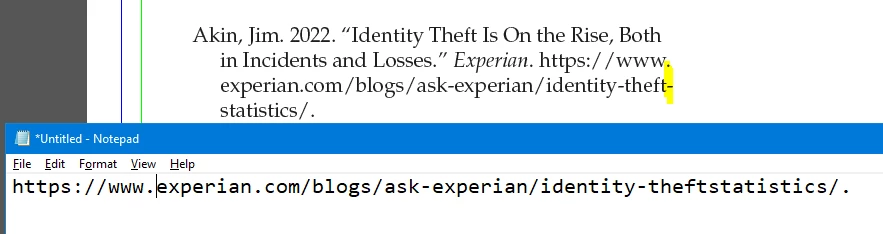
Problem is: Once the PDF has been generated from the InDesign file, the hyphen disappears when we copy/paste the highlighted hyphenated URL content from the PDF to Notepad. As a result, the word seems closer. The link is broken as a result on the web browser. Please see the image below.
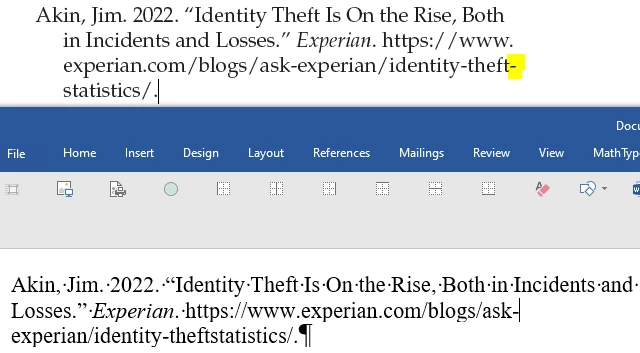
In the same way, when we tried to copy and paste the same content from a PDF into Word, the hyphen was still lost, and the word appeared close-up. Please see the image below.
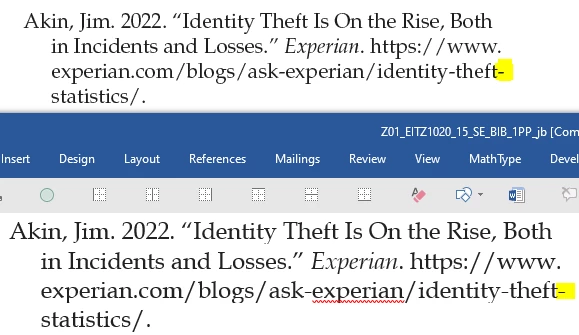
Finally, we attempted to use Adobe Acrobat Pro to export as Word. The hyphen was retained and the link works as expected. Please see the screenshot below.
If anyone encounters the aforementioned issue, please provide a solution. Alternatively, if it's a PDF bug, please let me know. Our client needs to get the resolution or response.
Thanks,
Santhosh


 AdChoices