
Inspiring
January 19, 2022
Question

Hello!!

  • January 19, 2022
  • 1 reply
  • 420 views

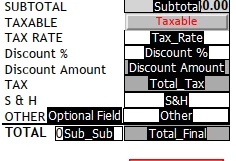
I have a sales order form that I need to calculate the tax based on the state the order is being placed from. The sales team would enter the tax percent amount in the text field "Tax_Rate" and then push a "Taxable" push button. From there the script would calculate from the "Subtotal" text field and display it in the "Total_Tax" field. Any help would be appreciated, I have zero training in Javascript...
 

This topic has been closed for replies.

1 reply

try67
Community Expert
Community Expert
January 19, 2022

You should use a check-box for the "Taxable" option, not a button. Then all you'll have to do is set its Export Value to "1" and you would be able to use the built-in Product option in the Calculate tab of your total tax field to calculate the tax, by multiplying the subtotal by the tax rate and the taxable check-box.

glazed01Author
Inspiring
January 27, 2022

Thanks for the advice @try67. I added a check box for the "Taxable" option with the following script. The script seems to work well for calculating a singular tax amount.


this.getField("Total_Tax").value=this.getField("Subtotal").value*.06;


How would I change this formula to calculate the taxes based on an entered percentage in the "Total_Tax" field?

try67
Community Expert
Community Expert
January 27, 2022

Sorry, I don't quite follow what you mean...