


Participant
July 11, 2026
Answered

Help converting to PDF/X when the software is being buggy.

  • July 11, 2026
  • 3 replies
  • 41 views

I need to save a PDF/A as a PDF/X.  

I own a three year license for Acrobat Pro 2024, installed on a Windows laptop.  
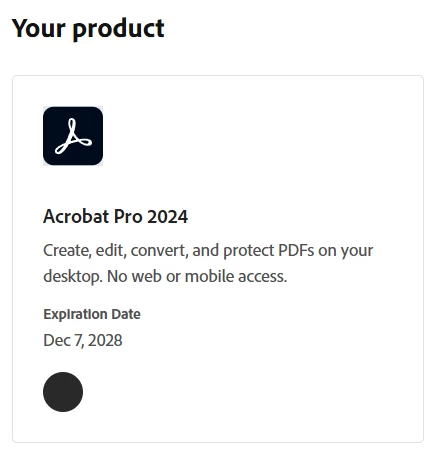
When I choose Save as Other / PDF/X, it says it needs to download additional components and to wait.  Several minutes later it reports that it can’t download and gives a link for manual download.  

https://helpx.adobe.com/acrobat/kb/download-64-bit-installer.html

Downloading and installing that version says that my account (which it recognizes) doesn’t have a subscription and that I need to buy a subscription (instead of my existing license).  

I obviously don’t want to do that - my existing purchase of the full version of Acrobat Pro 2024 should be capable of a Save As, right? 


My license also includes access to the online suite that operates in my browser.  I was able to upload my file to Adobe Express to see if I could save it as PDF/X that way.  It garbled all my tables, however, and so is unusable.  

Seperately, is it possible to save as an epub?  The converter I used for that also garbled the tables.  It would be great if Adobe worked to solve that problem as well, since they’re all correctly formatted in the PDF/A file that I’m starting with from Word.  


I appreciate any help!  This is pretty frustrating, as I assume this is basic stuff. 
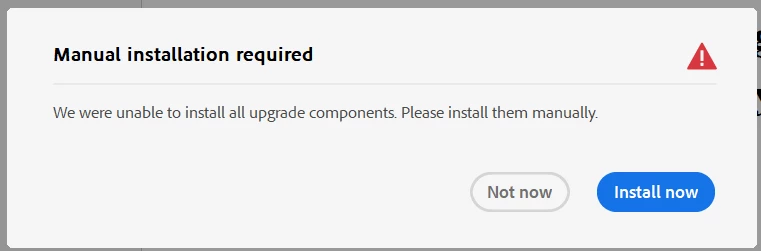


(I’ve reinstalled the properly licensed version.  I had it check and confirm that it has no available updates.  I’ve used the repair function to confirm the installation is fine.  I don’t know what it needs before it can save as a PDF/X and why this won’t just install with the Windows application.) 

    Correct answer Andrew H.

    Thank you.  That’s the same edition I have installed.  I uninstalled it, downloaded it fresh from your link, reinstalled from the new file (rebooting between each).  I got the same error - that it needed to download addtional components and it couldn’t, then redirecting me to install the incorrect version.  


    What worked:  
    I then uninstalled it again and installed it again.  I noticed on the setup wizard that it had a “configure” button.  I went in and manually selected to have it install all components on the hard drive. By default, it was leaving features uninstalled.  

    Having forced it to install all features through the setup wizard, it then worked fine and saved the PDF/X file.  


    3 replies

    Andrew H.Author
    Participant
    July 13, 2026

    Seperately, is it possible to save as an epub?  The converter I used for that also garbled the tables.  It would be great if Adobe worked to solve that problem as well, since they’re all correctly formatted in the PDF/A file that I’m starting with from Word.  


    Can Adobe save a PDF as an ePUB? 

    Meenakshi0101
    Community Manager
    Community Manager
    July 14, 2026

    Hi Andrew H.,


    Thank you for sharing the information. Glad to know the feature is working now.

    In Acrobat, you cannot save the PDF to ePUB format. You can use the Adobe InDesign application for that. For more information, refer to the following help document: Export to EPUB.


    Let us know if you have any questions or need help.


    Thanks,

    Meenakshi

    Andrew H.AuthorCorrect answer
    Participant
    July 13, 2026

    Thank you.  That’s the same edition I have installed.  I uninstalled it, downloaded it fresh from your link, reinstalled from the new file (rebooting between each).  I got the same error - that it needed to download addtional components and it couldn’t, then redirecting me to install the incorrect version.  


    What worked:  
    I then uninstalled it again and installed it again.  I noticed on the setup wizard that it had a “configure” button.  I went in and manually selected to have it install all components on the hard drive. By default, it was leaving features uninstalled.  

    Having forced it to install all features through the setup wizard, it then worked fine and saved the PDF/X file.  


    Andrew H.Author
    Participant
    July 11, 2026

    (I’ve reinstalled the properly licensed version.  I had it check and confirm that it has no available updates.  I’ve used the repair function to confirm the installation is fine.  I don’t know what it needs before it can save as a PDF/X and why this won’t just install with the Windows application.) 


    Meenakshi0101
    Community Manager
    Community Manager
    July 13, 2026

    Hi Andrew H.,


    Thank you for reaching out!

    We are sorry for the trouble caused. Please try reinstalling the application from the following page: https://helpx.adobe.com/acrobat/kb/download-acrobat-pro-2024.html.

    After reinstalling, please attempt the steps again. If the issue persists, kindly share a short video demonstrating the steps you took and the error you encountered. Additionally, please provide the version numbers of Acrobat and your operating system.


    Let us know how it goes.


    Thanks,

    Meenakshi