
Participant
March 13, 2025
Question

Help creating automation for adding headers that reference file and folder name

  • March 13, 2025
  • 2 replies
  • 581 views

Hi I am trying to figure out a way to help automate a header process. Below is my header that I want to create. As you can see, the center and part of the right column I want to make dynamic to reference the folder name and the first part of the file name. New to this- from what i have researched this seems possible using a set of guided actions that incorporates javascripts.


Overall I want to click 1 action and have acrobat do the following:

1. Flatten PDF

2. Shrink PDF contents so that adding header does not interfere with contents, maintains uniform margins across all files.

3. Add custom header as shown below

4. Save PDF


Would be even better if I can select multiple PDFs to all run at the same time.
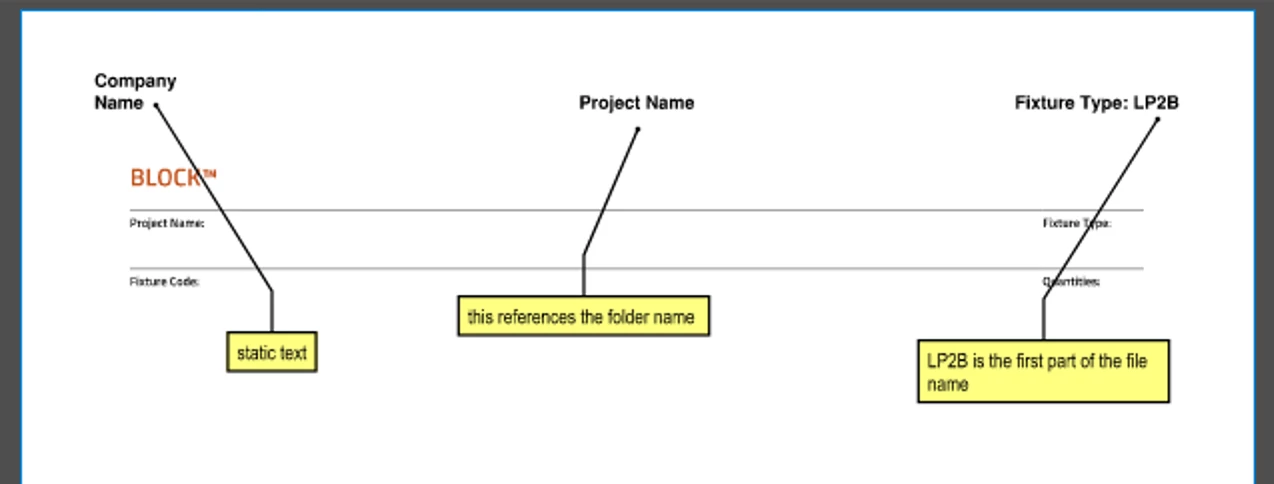


All my file names have a "_" after the fixture type which should help when creating a script to retrieve the partial file names.

2 replies

JR Boulay
Community Expert
Community Expert
March 13, 2025

You can use JavaScript to split file names and place the split part in the form fields.

Then carry out steps 1, 2 and 4.

This can be done in an Acrobat action or in an application-level script.

Acrobate du PDF, InDesigner et Photoshopographe
PDF Automation Station
Community Expert
Community Expert
March 13, 2025

What type of files are those?

Participant
March 13, 2025

they are .PDF files. currently defaults to using Bluebeam

PDF Automation Station
Community Expert
Community Expert
March 13, 2025

Create a form field, or fields (left is left justified, center is center justified, right is right justified.  To the the folder name:

this.path.split("/")[this.path.split("/").length-2];

To get the file name:  this.documentFileName

To flatten:  this.flattenPages();

Use an Action with Execute JavaScript for the above, and use other action commands for the rest.