This topic has been closed for replies.
Correct answer half92640947

Spoke with Adobe, was told they will not support and will not fix this problem. My time alone was over the price of upgrade ($200) to Acrobat 2017, which does work with the exact same signature.

What a coincidence that it stopped working 3 months after Adobe declared End of Support.

1 reply

cadbury
Adobe Employee
Adobe Employee
February 16, 2018

Dear User,

Thank you for reporting the issue. Please confirm if you are opening Acrobat/Reader in any other language other than English.

Once you have applied the signature, the font of the signature should not be changed ideally. Please can you share the file for investigation if you do not have any confidential information .

Thanks and regards,

Participant
February 16, 2018

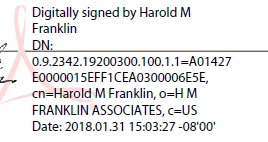
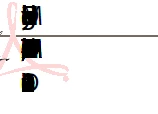
No, the problem is NOT with old signatures (one of which is shown in the question), the problem is with NEW signatures (also shown). Here is the process I've used for years:

1) run Win 10 Pro version 1709 Build 16299.248 x64 (all patches applied)

2) open any pdf with Adobe Acrobat XI Version 11.0.23

3) click 'place signature' and drag rectangle

Pop-up for appearance shows mangled appearance as shown above. If I continue, document appears with mangled signature in dragged area. If I save, reopen w/ Acrobat or Reader, same appearance.

This appears to relate to windows update, not Acrobat. Repairing Acrobat using Windows installer has no effect.

I don't know how to open Acrobat or Reader in another language, and I am not doing anything different than I always do, so no.

half92640947AuthorCorrect answer
Participant
February 16, 2018

Spoke with Adobe, was told they will not support and will not fix this problem. My time alone was over the price of upgrade ($200) to Acrobat 2017, which does work with the exact same signature.

What a coincidence that it stopped working 3 months after Adobe declared End of Support.