Participant
October 10, 2022
Answered

Help for Set PDF metadata from Acrobat JavaScript

  • October 10, 2022
  • 3 replies
  • 2882 views

Hello dera friends,

in the published post `Get and Set PDF metadata from Acrobat JavaScript` by Mr. Thom Parker (https://acrobatusers.com/tutorials/get-and-set-pdf-metadata-from-acrobat-javascript/) is code for changing `Custom properties` in Acrobat. The JS code is: this.info.mySpecialProp = 3; // Create a custom entry


I'm wondering how to add a DOT in the code above? Namely, if I want to use a code with a dot like `this.info.mySpecial.Prop = 3; (where DOT is present in custom name aka mySpecial.Prop)` this JS code does not work with the ActionWizard function. Can someone help me to solve the problem? Thanks in advance for your reply and any suggestion.


BR Aljoša

This topic has been closed for replies.
Correct answer try67

As with most JS properties, you can do it if you access the property name as a string, instead of a variable name.

So use this instead:

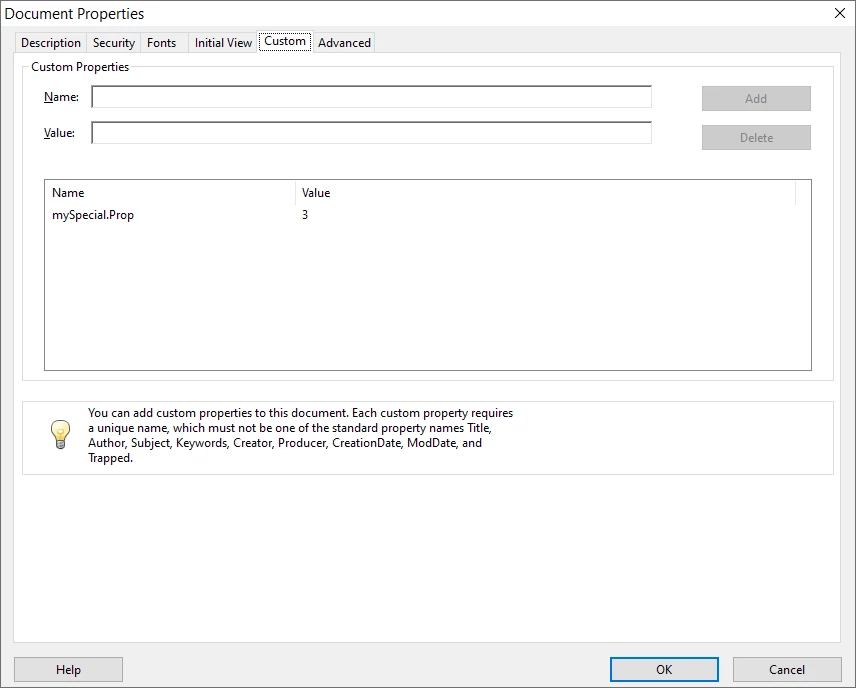
this.info["mySpecial.Prop"] = 3;

The result:

You'll also need to access it the same way later on, though.


3 replies

try67
Community Expert
try67Community ExpertCorrect answer
Community Expert
October 10, 2022

As with most JS properties, you can do it if you access the property name as a string, instead of a variable name.

So use this instead:

this.info["mySpecial.Prop"] = 3;

The result:

You'll also need to access it the same way later on, though.


Legend
October 10, 2022

That's a neat trick! Thank you.

JR Boulay
Community Expert
Community Expert
October 10, 2022

As you can see the dot is used as a separator, so you cannot use it in a custom metadata name.

Acrobate du PDF, InDesigner et Photoshopographe
Participant
October 10, 2022

Hi there and thanks JR Boulay and Test Screen Name...I kown that but I also needed confirmation from any of you by`those who know more' that there is no trick/hack that I could use...unfortunately, I need a DOT because of the requirements of the agencies and because we have a lot of these kinds of documents...well...I will correct the change of record with Notepad++ (its time consuming, but I will satisfy the agencys requirements according to the record in `custom properties`).  I wish you a nice and pleasant day. Regards Aljosa

Legend
October 10, 2022

The info object is accessed by properties that are JavaScript names. You cannot use a dot in a name. So, this seems impossible; I suggest you rethink your plans.