
tmbeyerII
Participant
June 8, 2020
Question

Help Reduce Document Overhead

  • June 8, 2020
  • 5 replies
  • 5722 views

Hello, I have been trying to reduce my file size for some time and cannot figure it out. I created a flyer using illustrator and then saved a copy as a pdf and used the "reduce file size" feature in acrobat. However, my file is still a little over 1gb. I then ran a space usage audit and discovered that 93% is document overhead. 
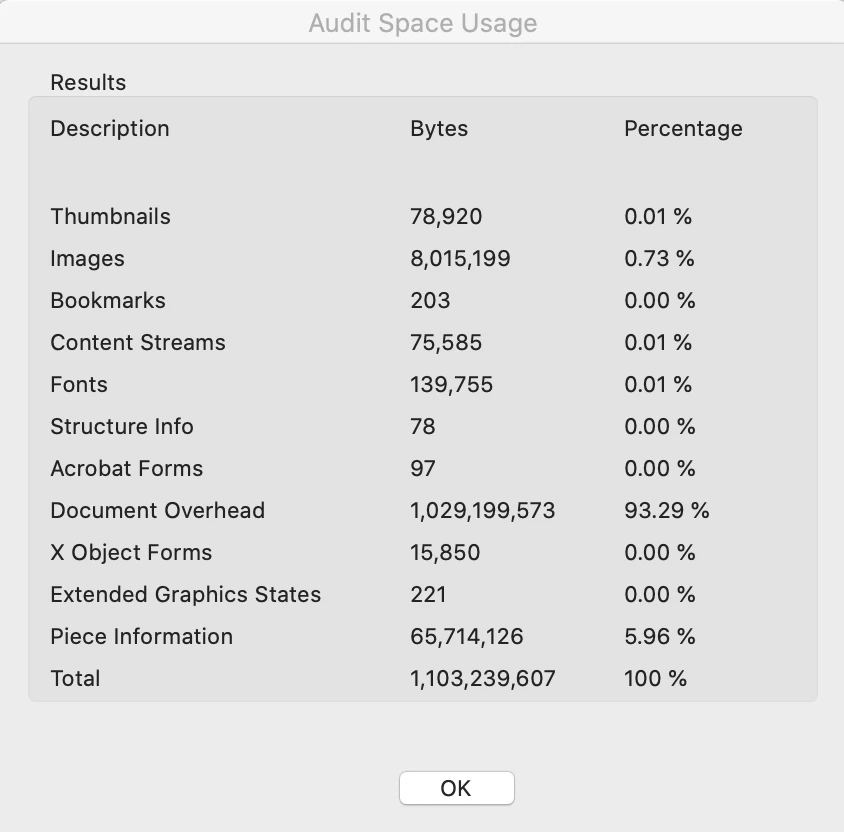
I have tried discarding objects, user data and many of the subcategories of these and haven't had any success in getting the file any smaller. 


Any help would be greatly appreciated! 

This topic has been closed for replies.

5 replies

JR Boulay
Community Expert
Community Expert
March 31, 2023

When you're save as the document with Illustrator be sure to not tick the "Retain Illustrator's editing features"*  option, which will prevent having two files (AI + PDF) in one, and thus reduce its weight.


*Translated from French, I do not know the exact item in English

Acrobate du PDF, InDesigner et Photoshopographe
Participant
March 31, 2023

I am unsure if this will be helpful but I have just done three tests to accertain which process is the best for reducing the size of pdf documents with fillable fields. I converted a MS Word document to pdf using three options. 

  1. Saving the document as an Adobe pdf
  2. Opeing the document in Adobe Acrobat Pro
  3. Printing the document to Microsoft print to pdf

All three had exactly the same pdf document size, however when I added a field to number 3 the document size doubled. 

Number 3 did not prepare the form efficiently which led to me having to insert a number of missing fields.

The document overhead storage was significantly less in numbers 1 and 2.


Sparrowhawk-AES
Known Participant
June 9, 2020

Hola. One trick that I have used when I have recieved large, layered PDF files is printing the file to a PS file and distilling the PS file.  The settings on the distiller can be set to an acceptable, low resolution setting.  When printing the PS file I also use "outlines" for the fonts and subset the fonts.  This reduces the possility of editing the PDF afterward but creates a considerably small file.  Let me know if that works for you.


gary_sc
Community Expert
Community Expert
June 8, 2020

How did you save the file from AI? 


Also, what is your OS (and what release)?

Which version of Acrobat (and what release)?


Typically Document Overhead is embedded fonts. Do you have a number of unique fonts embedded in the document?

tmbeyerII
tmbeyerIIAuthor
Participant
June 9, 2020

I saved the file as a pdf in illustrator. Also I'm running a mac version 10.15.4 and I'm on continuous release of acrobat. As for the fonts, I'm mostly using DIN condensed and DIN alternate. Im not sure if these are unique fonts. I appreciate the help.


try67
Community Expert
Community Expert
June 8, 2020

A trick that often works is simply saving the file under a new name in Acrobat. It forces an optimization and can reduce the file-size dramatically.

tmbeyerII
tmbeyerIIAuthor
Participant
June 9, 2020

I tried this and unfortunately it didn't further reduce the file size. Thanks for the tip though!