
Known Participant
May 28, 2010
Question

Help—"Suite Product Activation Needed"—Acrobat Pro CS5

  • May 28, 2010
  • 6 replies
  • 36021 views

Hello.

I searched the forums but no one seems to have this problem (or I missed it).

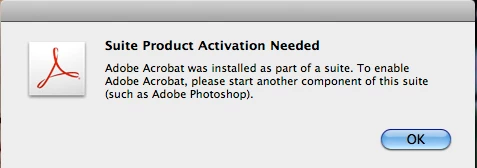
See enclosed JPEG. It says,

"Suite Product Activation Needed

Adobe Acrobat was installed as part of a suite. To enable Adobe Acrobat, please start another component of this suite (such as Adobe Photoshop)."

Yes, I entered in the CS5 serial number and activated the suite through Photoshop. Yes, I entered in the separate serial number for Acrobat. It was accepted but then gives me the activation error. Yes, I tried deactivating CS5, rebooted, reactivated CS5, relaunched Photoshop CS5, relaunched Acrobat, and... same error.

Anyone have a solution? (other than trying to uninstall and reinstall the Suite which I really don't want to do)

Rudy
    This topic has been closed for replies.

    6 replies

    Participant
    December 2, 2011

    I have cs4 and cs5 master collection installed.  I opened both Photoshop from CS4 and CS5 at the same time, then opened Acrobat from the applications folder, and the message went away.  I had open both before, but not at the same time.  Good Luck

    Dee Gardner

    USA

    Participant
    October 3, 2011

    I also experienced this issue when I transferred a user from an iMac with Snow Leopard to a new iMac with Lion. CS3 and CS4 had been used on the old iMac. Only CS5 was transferred.

    I fixed it by copying Photoshop CS4 from another Mac on the network the new iMac. Opened it OK. Next time I opened Acrobat 9, the error message was gone.

    Regards,

    Willy T. Koch

    Norway

    May 25, 2011

    So let me get this right - the only way to fix this bloody annoying error is to completely remove CS5 from my machine, re-install it from original DVD, and let the Adobe Updater bring it back up to the latest version again?

    This is exactly how it got in this state in the first place!!!! WTF?

    MichaelKazlow
    Legend
    May 27, 2011

    You can try the license report tool.

    http://www.adobe.com/support/contact/licensing.html

    May 27, 2011

    Thanks, Michael. I've just run this script, but there's been no change in behaviour with Adobe Professional - it just quits after the message in this thread appears.

    Participant
    May 11, 2011

    I got a new macbook pro and used Time Machine to move my old mac to my new mac.  Everything worked fine except Acrobat.  It's giving me this stupid message and won't open.

    I've deactivated CS5 on the old machine.

    I don' tknow why this is so infuriating.

    MichaelKazlow
    Legend
    May 11, 2011

    It is always best to re-install the CS Suite products moving from one machine to another just doesn't cut it. Even if you think all of the other products are working fine, something may bite you and you'll never know why.

    April 25, 2011

    Go to adobe.com and download the Adobe Cleaner Tool.

    A link to that tool can be found in cpsid_82947

    Even if you have uninstalled your previous suite (CS4 and/or CS3) there might be traces of the said suite(s)

    And you can removed them by this tool.

    Uninstall Acrobat 9 Pro, then reinstall it.

    Once reinstalled, launch Acrobat 9 Pro.

    Accept the EULA then enter the Acrobat 9 Pro serial number.

    rudy713Author
    Known Participant
    May 29, 2010

    Hey Kids. Problem solved.

    When I installed CS5, I deactivated CS4 but did not UNINSTALL it. So I had both "Suites" residing in my system.

    Today, I went ahead and uninstalled the CS4's bits and pieces and, POOF!, Acrobat disappeared. Well, that was not predicted.

    I then went ahead and popped in the Acrobat CS5 DVD (yes, I had installed it before), reinstalled it, entered in the proper serial number, and POOF!, it worked. Funny thing is that Photoshop CS5 gave me a "can't run" error when I went to it but that cleared up when I quit and relaunched it.

    Obviously, Adobe has not groomed Acrobat to be a proper CS5 companion and so there are some bugs crawling around.

    I hope that this helps with anyone else running into this problem.

    Cheers. Rudy.

    Participant
    January 21, 2011

    Thanks Rudy. I had the same issue after CS4's uninstaller destroyed my CS5 installation. I had to reinstall CS5 entirely.

    Even after doing so, Acrobat refuses to run - gives me the same "activation needed" message as it did you.

    So, like you, I installed Acrobat again from the original DVD.

    Yet, I'm still having the same problem from Acrobat and cannot use the product. I've launched the other CS5 programs and they run fine.

    Would be nice if Adobe could figure out these install and uninstall routines.

    Anyone else know what I should do here?

    Inspiring
    January 28, 2011

    I ran the following, but it did not help, it may work for you

    http://www.adobe.com/support/contact/licensing_download_eula.html

    i`m contacting customer service.