
Help with null vs 0s Adobe Form Issue
I have 3 calculated fields.
Field1: sum of 5 values at timepoint1
Field 2: sum of 5 values at timepoint 2
Field 3: based on Field1 and Field2 sums ( it's a % change) --- (sum2-sum1)/sum1
The problem is this:
Field 2 is defaulting at 0 before anyone enters a 0. It should be null until a value is entered. Valid values can be 0,1,2,3,4 etc. anything greater or equal to 0.
Field 3 is then calculating before Field 2 has a valid entered value - because of the default 0 for Field2. I need it to calculate when an actual >=0 value is entered for field2.
How can I do this? I've tried so many options - the typical event.value==0 et.et. But i need to figure out with my limited javascripting how to ....any help will be awesome.
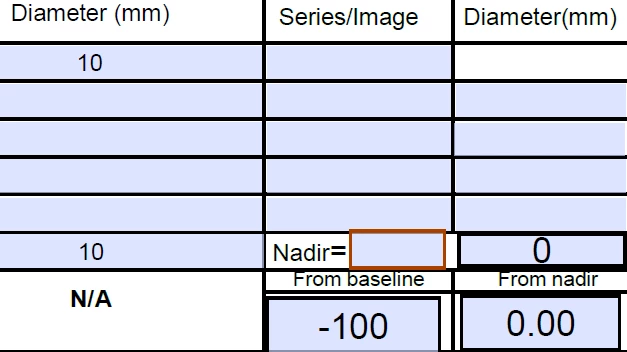
Example below:
the 10= FIELD1
Field 2: Diameter (mm) value = 0 because nothing is entered in the rows above - see all NULLS
Field 3: From BASELINE = -100 because its' calculating percent change from (0-10/10) *100 = -100. I need the 0 only to be calculated if that sum really is 0 vs null as it is now


 AdChoices